
E-commerce SEO: How to Get an Indian Online Store Ranking on Google
Most Indian online stores are built the same way. Someone sets up Shopify or WooCommerce, imports a product feed, launches, and then buys traffic. The ads work, the store makes sales, and everybody is reasonably happy until the cost per click climbs and the margins do not.
At that point the owner discovers something uncomfortable: after two years of trading, the store ranks for its own brand name and almost nothing else. Every visitor was rented. None of it was owned.
E-commerce SEO is the work of fixing that. It is less about writing and more about structure, and the order in which you do things matters enormously - most stores waste months optimising product pages when their category pages were the actual opportunity.
What's in this guide
- 1Why e-commerce SEO is different
- 2Start with structure, not keywords
- 3Category pages are where the traffic is
- 4The product page checklist
- 5The filter problem that buries stores
- 6Speed, on a 4G phone
- 7Keyword research for stores
- 8Out of stock, discontinued and seasonal products
- 9Content that actually helps a store rank
- 10What to fix first: a priority order
- 11A worked example: a 900-product homeware store
- 12Frequently asked questions
Why e-commerce SEO is different
If you have read general SEO advice, most of it applies here too. But stores have four problems a normal website does not.
Scale. A brochure site has twelve pages. A store has nine hundred products, each with variants, plus categories, plus filters. You cannot hand-optimise everything, so you need rules and templates that work at volume.
Duplication is built in. Two products differing only in colour produce near-identical pages. Filters generate thousands of URL combinations. Manufacturer descriptions are shared with every other retailer selling the same item.
Thin pages by default. A product page generated from a feed has a name, a price and two lines. There is nothing there for a search engine to rank.
The inventory keeps changing. Products sell out, get discontinued, come back. Every one of those events is a URL decision, and getting them wrong is how stores lose rankings they spent a year building.
None of this is unsolvable. But it does mean the work is mostly systems and structure rather than writing, which is why generic SEO advice tends to disappoint store owners.
Start with structure, not keywords
Before touching a single page, look at how the store is organised. Structure determines what is capable of ranking at all.
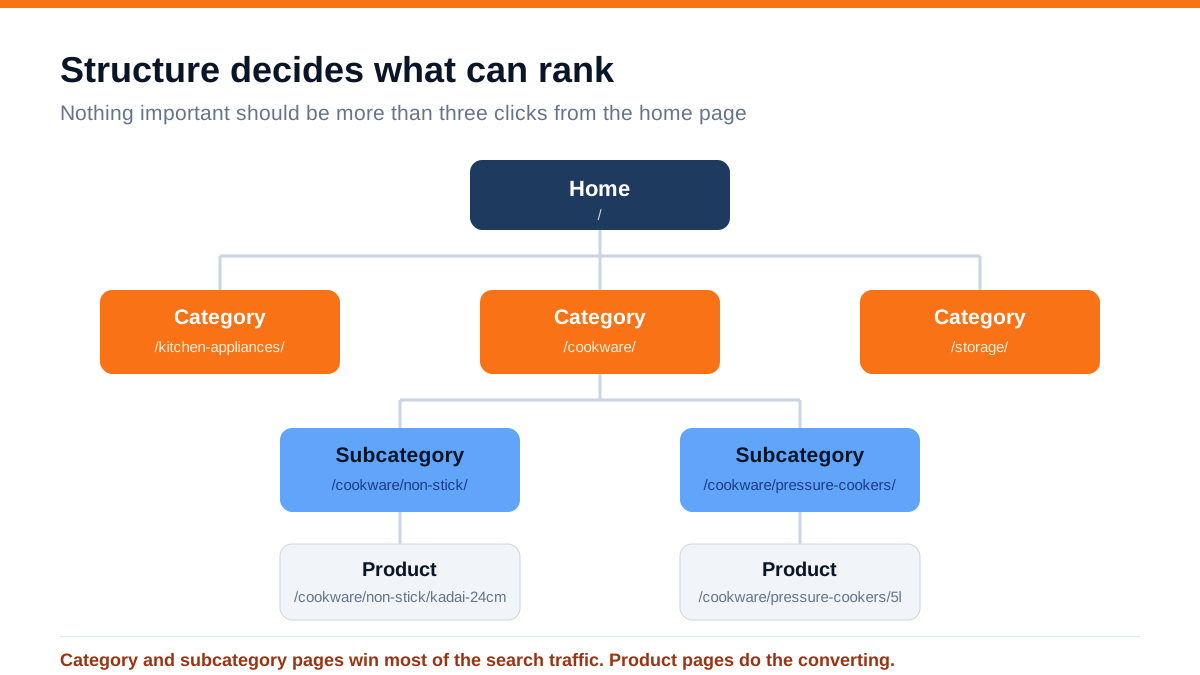
The rules are simple and most stores break at least two of them:
- Three clicks maximum from the home page to any product. If a product needs six clicks to reach, search engines will treat it as unimportant, because your own site does
- Categories reflect how people search, not how your warehouse is organised. If buyers search 'non-stick kadai' but your category is 'cast aluminium cookware', you have named your categories for yourself
- Readable URLs with the category in the path. `/cookware/non-stick/kadai-24cm` tells both a person and a crawler what this is. `/product?id=88421` tells neither
- Breadcrumbs on every page, with breadcrumb schema. Cheap to add, and they help both navigation and how your listing appears in search results
- One product, one URL. Variants should not each become a separately indexed page unless people genuinely search for them separately
Fixing structure on a live store means changing URLs, which means redirects. Do it once, do it properly with permanent redirects from every old URL, and do not do it piecemeal over six months.
Category pages are where the traffic is
This is the insight that changes results most, and it is counter-intuitive to most store owners.
People rarely search for a specific product by its exact name unless it is a branded item. They search for the category: 'non stick kadai online', 'pressure cooker 5 litre', 'office chair under 10000'. Those searches have far more volume than any individual product name, and they land on category pages.
Yet on most Indian stores, the category page is a grid of products with a heading and nothing else. There is no text for Google to understand, no reason to rank it above a marketplace listing.
What a category page needs:
- A real H1 that matches how people search - 'Non-Stick Kadai' rather than 'Products'
- 150 to 300 words of genuinely useful introduction above or below the grid: what to consider when choosing, what sizes suit what, price ranges. Not keyword-stuffed filler - a buyer's guide in miniature
- An FAQ block answering the four or five questions people ask about this category
- Internal links to subcategories and to your best-selling products
- A unique title and meta description, not a template with the category name dropped in
- Pagination handled properly so page two onwards does not compete with page one
If you have limited time, write proper content for your top ten category pages and ignore products entirely for now. That is usually the single highest-return SEO task available to a store.
The product page checklist
Product pages convert. They rank for long-tail and branded searches, which are lower volume but very high intent.
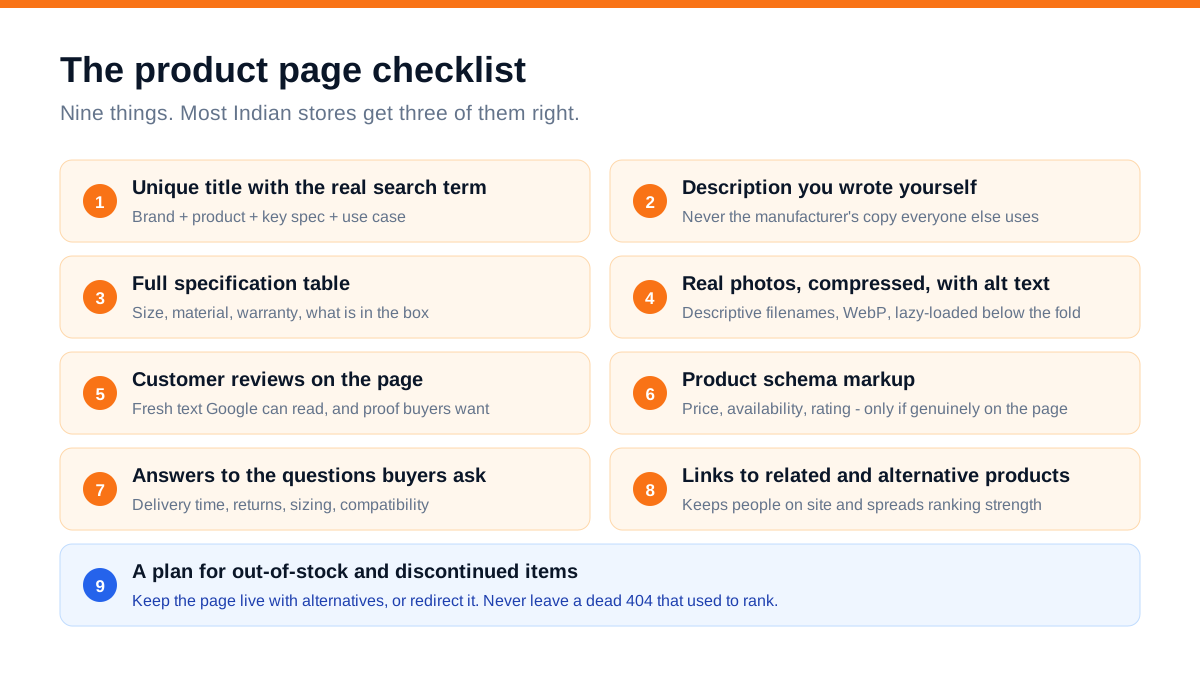
The one that matters most is the second: never publish the manufacturer's description. Every other retailer selling that product has the same text. There is no reason for a search engine to prefer your copy of it. Rewriting descriptions for your top 100 products is tedious and it works.
Beyond that:
- Titles should carry the real search phrase, not internal SKU language. Brand, product, key specification, use case
- A full specification table - size, material, weight, warranty, what is in the box. Buyers want it and it gives the page substance
- Real photographs rather than only supplier renders, compressed, in WebP, with descriptive filenames and alt text
- Customer reviews on the page. They add fresh text that search engines read, and they are the strongest conversion element on most product pages
- Product schema with price and availability - but only reflecting what is genuinely on the page. Marking up ratings you do not have is how stores collect manual penalties
- Answers to delivery, returns, sizing and compatibility questions, on the page rather than buried in a policy link
- Links to related and alternative products, which keeps people on the site and distributes ranking strength
Do the top 20% of products first. On most stores a small share of products drives the majority of revenue. Optimise those properly rather than doing a shallow pass on all nine hundred.
The filter problem that buries stores
This is the most common serious technical problem we find on Indian e-commerce sites, and store owners are almost never aware of it.
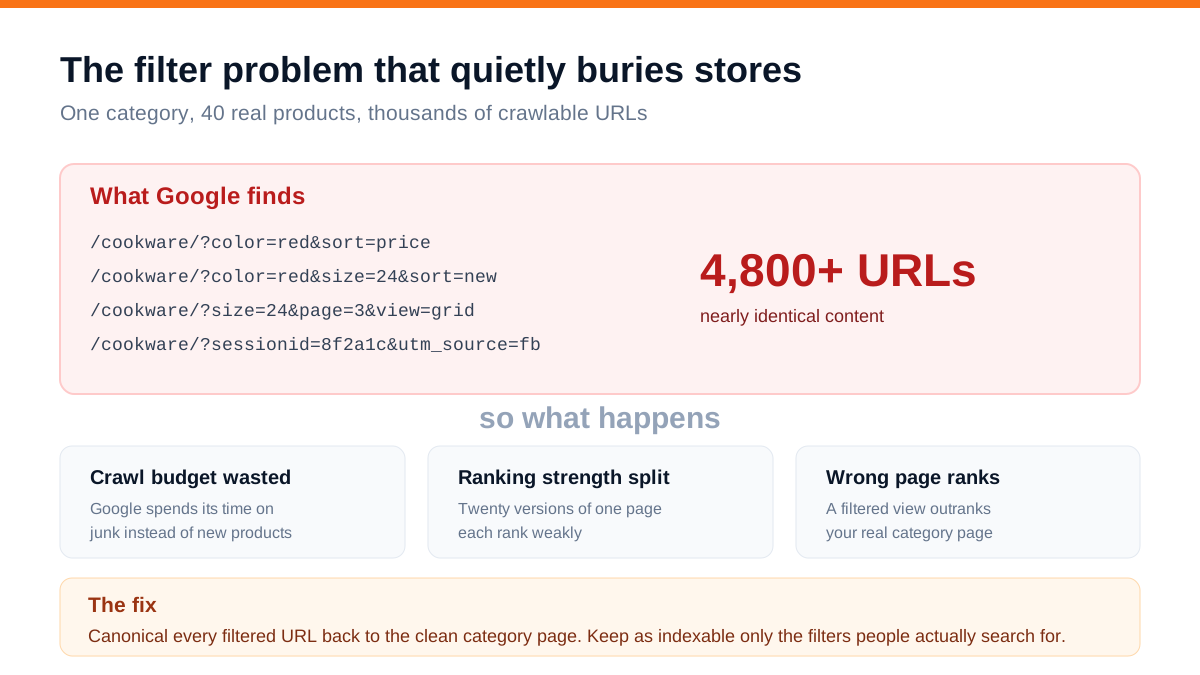
Every filter, sort order, view toggle and tracking parameter creates a new URL. Colour, size, price range, sort by price, page number, grid or list view - combined, a single category with forty products can generate several thousand crawlable URLs that are all essentially the same page.
Three things go wrong:
Crawl budget is wasted. Google spends its limited crawling on filter permutations instead of your new products, so new stock takes weeks to appear in search.
Ranking strength is split. Twenty near-identical versions of a page each rank weakly instead of one page ranking well.
The wrong page ranks. A filtered view - complete with a URL full of parameters - ends up in search results instead of your clean category page.
The fix, in order:
- 1Canonical tags on every filtered URL pointing back to the clean category page
- 2Decide which filters deserve real pages. If people genuinely search 'red non stick kadai', make that a proper indexable subcategory page with its own content. Everything else stays canonicalised
- 3Block obviously useless parameters - session IDs, view toggles, tracking parameters - from being crawled
- 4Keep your XML sitemap clean. It should list only canonical, indexable, in-stock URLs. A sitemap full of parameter URLs actively works against you
You can see the scale of this problem in Search Console under page indexing. If Google has discovered forty thousand URLs on a nine-hundred-product store, this is why.
Speed, on a 4G phone
Store speed is a ranking factor and, more importantly, a revenue factor. Every additional second before a page becomes usable costs conversions, and on mobile in India the effect is severe.
Test on a mid-range Android phone on 4G, not on your laptop on office wifi. The difference is often four or five seconds.
What typically slows an Indian store:
- Uncompressed product images. A 2 MB JPEG where a 90 KB WebP would look identical. This is usually the single biggest win
- Too many apps and plugins. Every review widget, chat popup, tracking pixel and abandoned-cart tool adds scripts. Audit them; most stores are running several they no longer use
- Sliders and carousels on the home page that load large images before anything else appears
- Popups that appear immediately, which are both an experience problem and a measured layout-shift penalty
- No lazy loading below the fold, so a category page loads forty full images to show six
Practical targets: main content visible in under 2.5 seconds on mobile, no visible layout jumping as things load, and buttons that respond immediately when tapped. The related discipline is covered in our guide on mobile-first design.
Keyword research for stores
Store keyword research is different because you are mapping keywords to a fixed inventory rather than inventing topics.
Work in three layers:
Category terms - highest volume, highest competition. 'Office chairs', 'non stick cookware'. These map to category pages and are your main traffic opportunity.
Modified terms - the money layer, and the one most stores ignore. 'Office chair under 10000', 'non stick kadai for induction', 'pressure cooker 5 litre stainless steel'. Lower volume, far higher intent, much easier to rank. Each of these deserves either a subcategory page or a well-optimised product page.
Product and brand terms - lowest volume, highest intent. These map to individual product pages and mostly take care of themselves if the pages are decent.
Where to find them without expensive tools: your own site search logs (what people type into your search box is the purest data you will ever get), Google autocomplete, the 'people also ask' box, and the search terms report in your Google Ads account if you run any. That last one is genuinely valuable - it tells you exactly which searches converted into purchases.
Out of stock, discontinued and seasonal products
Every store faces this and most handle it badly, losing rankings they spent a year earning.
Temporarily out of stock: keep the page live and indexed. Show the stock status honestly, offer a notify-me option, and link to alternatives. Do not delete it and do not redirect it - it will be back.
Permanently discontinued, with a direct replacement: permanent redirect to the replacement product. The ranking strength carries over.
Permanently discontinued, no replacement: redirect to the parent category. This is far better than a 404, and much better than leaving the page up to disappoint buyers.
Seasonal: keep the page live all year. A Diwali gifting category that only exists for six weeks a year will never rank, because it is starting from nothing every time. Keep it, update it, and let it accumulate authority.
Never mass-delete old product URLs during a platform migration without a redirect map. This is the most common way stores lose half their organic traffic overnight, and it is entirely avoidable.
Content that actually helps a store rank
Blog content on stores is usually a waste of effort, because it is written about topics that have nothing to do with buying. What works is content tied directly to purchase decisions:
- Buying guides - 'How to choose a pressure cooker size' - linked prominently to the relevant category
- Comparisons - 'Hard anodised vs non-stick: which for Indian cooking' - these capture people at the deciding stage
- Size, compatibility and care guides - the questions your support team answers repeatedly
- 'Best X under Y' pages on your own site, since that is a very common search pattern in India
The rule: every piece of content should link naturally to a category or product page. Content that does not feed a commercial page is entertainment. The broader case for this approach is in our guide to content marketing.
What to fix first: a priority order
If you do these in order, you will see movement fastest:
- 1Find and fix indexing problems. Search Console, page indexing report. If your products are not indexed, nothing else matters
- 2Canonicalise filter URLs. Stops the bleeding
- 3Write content for your top ten category pages. Usually the biggest single traffic gain available
- 4Compress every image on the site. Fastest measurable speed win
- 5Rewrite descriptions for your top 100 products
- 6Add reviews to product pages
- 7Build subcategory pages for high-intent modified searches
- 8Then start on guides and comparison content
Most stores try to start at step eight. That is why it feels like SEO does not work for e-commerce.
A worked example: a 900-product homeware store
A homeware store came to us doing about Rs 22 lakh a month, roughly 85% of it from paid advertising. Organic traffic was around 3,100 sessions a month, almost all of it brand searches.
Search Console showed 61,000 discovered URLs against 900 products - the filter problem in its clearest form. Only 340 product pages were indexed at all.
The work, over seven months, followed the priority order above. Nothing exotic: canonicals on filters, a cleaned sitemap, 400 to 500 words of buying-guide content on the top 14 category pages, image compression across the catalogue, rewritten descriptions for the top 120 products, and reviews enabled and requested by email after delivery.
By month seven: indexed pages went from 340 to about 1,240. Organic sessions went from 3,100 to roughly 19,600 a month. Organic revenue went from around Rs 3.3 lakh to Rs 11.8 lakh a month. Ad spend was unchanged - they simply stopped being the only source of customers.
The category page content alone accounted for a little over half of the traffic gain. It was also the cheapest part of the project.
On most online stores, the fastest SEO win is not more pages. It is fewer, better ones - and stopping Google from crawling forty thousand versions of the same category.
Frequently asked questions
How long does e-commerce SEO take to show results?
Technical fixes such as canonicalising filters and repairing indexing can show movement within four to eight weeks, because you are unblocking pages that already exist. Content and ranking gains on competitive category terms typically take six to twelve months. Stores usually see the sharpest improvement between months four and nine, once indexing is clean and category content has aged.
Should I optimise category pages or product pages first?
Category pages, almost always. They target higher-volume searches, there are far fewer of them, and most stores have left them completely bare. Optimise your top ten to fifteen categories before touching products, then work through the products that actually drive revenue rather than the whole catalogue.
Does Shopify or WooCommerce rank better on Google?
Neither has an inherent advantage. Both can rank well and both create the same duplicate-URL problems if configured carelessly. What matters is your URL structure, how filters are handled, page speed, and whether your pages have real content. Platform choice is a business decision, not an SEO one.
Do I still need Google Ads if my SEO is working?
Usually yes, for two reasons: SEO takes months to build while ads work immediately, and search advertising lets you appear for competitive commercial terms you may never rank for organically. Most healthy Indian stores run both, with the paid share falling over time as organic grows. Our comparison of Meta Ads and Google Ads covers where each fits for e-commerce.
What should I do with products that are out of stock?
Keep the page live and indexed if the product is coming back - show stock status, offer a notify-me option, and link to alternatives. Redirect permanently only when the product is genuinely discontinued: to the replacement if there is one, otherwise to the parent category. Deleting the page and leaving a 404 discards ranking strength you paid for.
How do I stop filters creating thousands of duplicate pages?
Add canonical tags on every filtered URL pointing to the clean category page, block low-value parameters such as session IDs and view toggles from crawling, and keep only genuinely searched filter combinations as real indexable subcategory pages with their own content. Then clean your XML sitemap so it lists only canonical, indexable URLs.
Where to start this week
Open Google Search Console and look at the page indexing report. Compare the number of discovered URLs against the number of products you actually sell. If the first number is many times the second, you have found your first project, and it is worth more than any amount of content you could write this month.
After that, pick your five best-selling categories and write four hundred words of genuinely useful buying advice on each. That is a weekend of work and it is the change most likely to move your traffic this quarter.
If you would rather have this handled, our SEO service covers technical audits, structure fixes, category and product optimisation, and the content programme that follows - and the packages page shows what each level costs. If you want a straight answer on what is holding your store back, send us your store URL and we will tell you what we find.