
AI Automation: The Practical Guide for Businesses (2026)
Most companies do not have an AI problem. They have a plumbing problem.
They have a model that can draft a good reply, a CRM that holds the customer history, an inbox that receives the enquiry, and a human who copies things between all three. AI automation is the discipline of removing that human from the copying - while keeping them firmly in charge of the judgment.
This guide is written from the implementation side. It covers what AI automation is, how it differs from the rule-based automation you may already run, where it pays for itself, where it quietly loses money, and how to build your first workflow without betting the business on it.
What's in this guide
- 1What is AI automation?
- 2How AI automation works
- 3AI automation vs traditional automation
- 4Benefits and limitations
- 5Real-world use cases
- 6Marketing, sales, support, operations and content
- 7Tools: Make, Zapier, n8n, Claude, ChatGPT and APIs
- 8AI agents vs workflows
- 9Step-by-step workflow examples
- 10Cost and ROI
- 11Common mistakes
- 12Security and human oversight
- 13How to start: a 90-day path
- 14The future of AI automation
- 15Frequently asked questions
What is AI automation?
AI automation is the use of artificial intelligence - usually large language models, but also speech, vision and classification models - inside an automated workflow, so that steps requiring judgment, language or unstructured data run without a person doing them manually.
The important word is inside. AI automation is not "using ChatGPT at work." A person prompting a chatbot and pasting the answer somewhere is assisted work, not automation: the human is still the runtime. It becomes automation when a trigger fires, the model does its part, and the result lands in a real system - a CRM record, a ticket, a WhatsApp reply, an invoice - without anyone shepherding it.
It is also not the same as "AI." A model on its own is a capability with no hands. Automation gives it hands and, just as importantly, gives it limits.
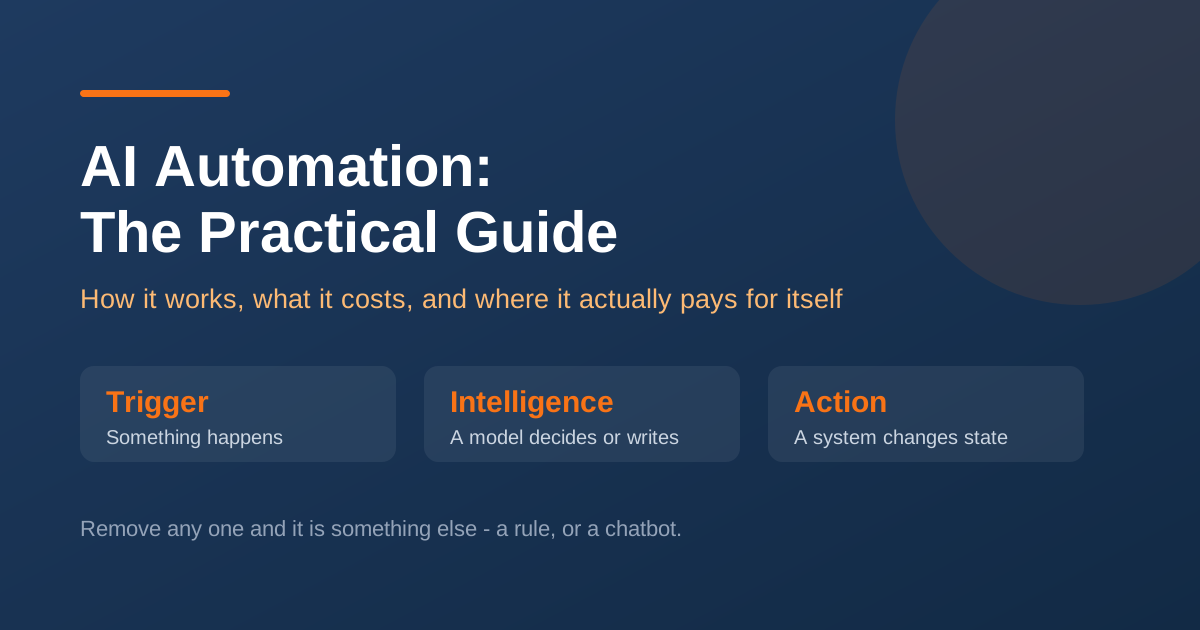
A working definition has three parts:
| Component | What it does | Example |
|---|---|---|
| Trigger | Something happens | A form is submitted, an email arrives, a call ends |
| Intelligence | A model interprets or generates | Classify the enquiry, extract the budget, draft the reply |
| Action | A system changes state | Create the lead, assign an owner, send the message |
Remove any one and it is something else. Trigger plus action with no intelligence is classic automation. Intelligence with no trigger and no action is a chatbot.
Neighbouring terms, briefly
- RPA - software that mimics clicks in a user interface. Deterministic, brittle, still common where legacy systems have no APIs.
- Workflow automation / iPaaS - connecting apps through APIs with rules. Zapier, Make, n8n. Deterministic.
- AI automation - the above, with model-driven steps handling language, judgment or unstructured input.
- AI agents - AI automation where the model also decides which steps to take, using tools, until a goal is met.
- Intelligent document processing - a mature subset: extracting structured data from invoices, IDs and contracts.
Most businesses that say they want "AI agents" actually want AI automation with a fixed path. That distinction is worth real money in avoided complexity.
How AI automation works
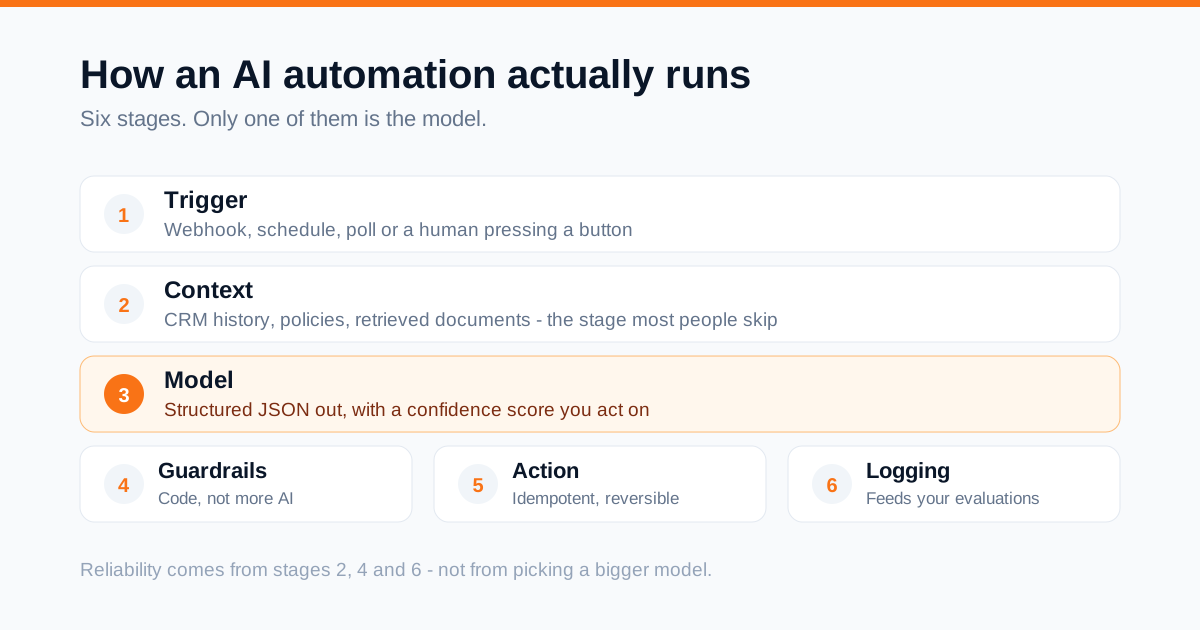
Almost every production AI workflow is the same six-stage pipeline.
1. Trigger
Webhooks are fastest and most reliable - the source pushes the event instantly. Polling checks every few minutes; simpler, slower, wasteful. Schedules handle recurring work. Human triggers - a button, a Slack command - are underrated and the right choice for anything sensitive.
2. Retrieval and context assembly
This stage decides whether output is useful or generic, and it is the one most people skip.
A model knows the world in general; it does not know your pricing, your service names, or your conversation with this customer. Before asking it to do anything, assemble the context: fetch CRM history, pull the relevant policy, attach the last three tickets. For a large knowledge base, use retrieval-augmented generation (RAG) - embed your documents, store them in a vector index, and retrieve only the passages relevant to this query.
A model given the right five paragraphs beats a bigger model given nothing, almost every time. Context quality matters more than model choice.
3. The model step
Call the model with the role, the task, the assembled context, the constraints and - critically - the output format. Two rules make model steps behave in production.
Ask for structured output. Do not generate prose you then have to parse. Ask for JSON and validate it against a schema.
A classification step should return a schema like this, not prose:
- intent - "pricing" | "support" | "partnership" | "spam"
- urgency - 1-5
- budget_mentioned - number | null
- summary - string
- confidence - 0.0-1.0
Ask for confidence, and act on it. A model reporting 0.42 has told you something valuable. Route low-confidence results to a human queue instead of into your database. This single pattern prevents most failures people attribute to "AI being unreliable."
4. Validation and guardrails
Between the model and your systems, put code - not more AI. Does the JSON match the schema? Is the extracted budget a plausible number and not a phone number? Does the draft contain a price, a promise or a date, and therefore need approval? Has this customer already been messaged in the last hour? Guardrails are boring, deterministic, and where reliability actually comes from.
5. The action
Write to the real system. Two properties matter. Idempotency - if the workflow runs twice for one event, do not create two leads. Reversibility - prefer actions you can undo. Drafting an email is reversible. Sending it is not.
6. Logging and evaluation
Log input, assembled context, raw model output, decision and final state. Without this you cannot debug, improve, or explain to a customer why they received something.
Then close the loop: sample runs weekly, mark good or bad, turn the bad ones into test cases. An evaluation set of 30–50 real examples, run against every prompt change, is the difference between a system that improves and one that drifts.
AI automation vs traditional automation
The honest framing: traditional automation is better wherever it can do the job. It is cheaper, faster, predictable and easy to audit. AI earns its place only where input is unstructured or the decision needs judgment.
| Dimension | Traditional automation | AI automation |
|---|---|---|
| Input | Structured - fields, rows, IDs | Unstructured - emails, calls, PDFs, chats |
| Logic | Explicit rules you write | Instructions and examples; the model generalises |
| Behaviour | Deterministic | Probabilistic - same input, similar output |
| The unexpected | Breaks or does nothing | Attempts a sensible response, sometimes wrongly |
| Cost per run | Effectively zero after setup | Per-token, ongoing |
| Latency | Milliseconds | Hundreds of milliseconds to tens of seconds |
| Maintenance | Update rules when the process changes | Tune prompts and context; watch for drift |
| Best for | Routing, syncing, calculating, scheduling | Classifying, extracting, summarising, drafting |
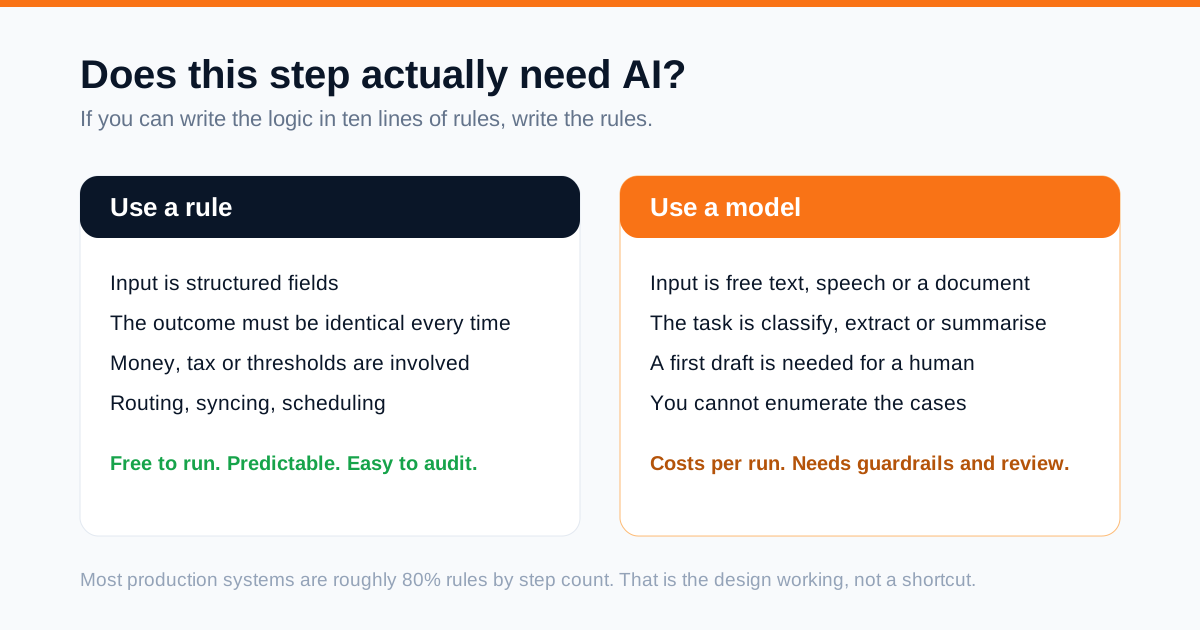
The rule I apply on every project: if you can write the logic down in under ten lines of plain rules, write the rules. Use a model only for the part you genuinely cannot specify.
Lead routing shows the split. "If the service field is 'SEO', assign to the SEO team" needs no AI. But "read this free-text message and work out which service they want, whether they are a buyer or a job applicant, and how urgent it sounds" cannot be written as rules that survive contact with real humans.
The strongest systems are hybrids, usually 80% deterministic by step count. The AI is a small, well-fenced component in a larger, boring, reliable machine.
Benefits and limitations
What you genuinely gain
Response speed, which is often the real revenue lever. For inbound enquiries, the gap between a five-minute and a five-hour reply usually matters more than any improvement to your sales pitch. Automation removes the wait entirely, including nights and weekends.
Consistency. The tenth enquiry of the day gets the same quality as the first. Your best-performing reply becomes the default rather than the exception.
Coverage of work nobody was doing. The underrated benefit. Most businesses do not summarise every call, tag every ticket by root cause, or chase every quote that went quiet - not because it is unimportant but because there is no time. Automation creates output that never existed.
Capacity without proportional headcount. Volume can triple without the team tripling.
A structured record of unstructured events. Once calls and chats are summarised and tagged, you can query them: "what were the top five objections this quarter?"
What you must plan around
Non-determinism. Identical inputs can produce different outputs. Anything needing exact reproducibility - financial calculations, compliance thresholds - belongs in code, with AI limited to extraction and drafting.
Confident errors. Models produce fluent, plausible, wrong answers. An error that looks wrong is a nuisance; one that reads perfectly is a liability. Hence grounding in retrieved context, structured outputs, and human approval on outbound content.
Ongoing cost. Every AI step costs money on every run. A workflow that is cheap at 200 runs a month may need re-engineering at 200,000.
Silent drift. Providers update models; your prompts were tuned against the old behaviour. Without an evaluation set you discover regressions through customer complaints.
Integration reality. The bottleneck is rarely the model. It is the CRM with an undocumented API, the accounting system that only exports CSV, the legacy tool with no webhooks.
Change management. A workflow the team does not trust gets bypassed. Adoption is a bigger project risk than accuracy on most engagements.
Real-world use cases
Inbound enquiry triage. Every form, WhatsApp message and info@ email lands in one pipeline. It pairs naturally with the funnel work in our guide to generating quality leads online. The model classifies intent, extracts name, service, budget and timeline, scores urgency, drafts a contextual reply, creates the CRM record and notifies the owner. Junk and job applications are separated before they pollute the pipeline. Works because input is genuinely unstructured and speed has direct commercial value.
Call and meeting intelligence. Recording to transcript to structured summary: what was discussed, what was agreed, objections raised, next step, owner, date - written into the CRM with tasks created. Replaces a task that is usually skipped or done badly at 7pm.
Document and invoice processing. Invoices and delivery notes arrive as PDFs and photographs. The pipeline extracts line items, totals, tax and dates, cross-checks against the purchase order, and flags mismatches. Low-confidence extractions go to review. Unstructured input, structured output, easily measured accuracy.
Support deflection and ticket assist. A retrieval-grounded assistant answers repeat questions from your actual documentation, cites sources, and escalates when unsure. For tickets reaching humans, the model pre-tags category and sentiment and drafts a first response to edit.
Quote and proposal generation. From a qualified enquiry, draft a proposal using your real catalogue and pricing rules. Prices come from your database via code, never from the model - it writes the narrative around numbers it is handed.
Follow-up that reads the room. Instead of a fixed drip, the next message reflects what was discussed and objected to, so quiet quotes get a relevant nudge rather than "just checking in."
Reporting. Pull numbers from analytics, ads and CRM, compute deltas in code, and have the model write the narrative: what moved, what likely caused it, what to check.
Recruitment screening. Parse CVs against structured requirements and produce a comparison table with evidence. Never auto-reject - screening carries legal exposure in most jurisdictions. This is a shortlisting aid, not a decision-maker.
Marketing, sales, support, operations and content
Marketing
The highest-value marketing automation is not content generation - it is the connective work around campaigns. If you are still building the underlying channel, start with the fundamentals in our content marketing guide.
- Ad copy variants at scale from a validated brief, with performance fed back so the next batch learns from what converted.
- Landing page briefs from search data: cluster Search Console queries by intent, find pages competing for the same term, generate a consolidation plan.
- Review and comment triage across platforms, with negative reviews escalated in minutes and a draft response ready.
- Competitor monitoring: watch pricing pages and ad libraries, summarise only what changed.
- Attribution enrichment: normalise messy free-text "how did you hear about us?" answers into a reportable field.
On generated content and search: quality and usefulness matter, not the tool used. Mass-produced pages with no first-hand insight underperform whether or not a model wrote them. Use automation for research, structure and first drafts, then add the expertise and examples only your business has.
Sales
- Lead enrichment and scoring from a company name and website, with the reasoning recorded.
- Pre-call briefings 15 minutes before every meeting: who they are, what they asked, what was said last time.
- CRM hygiene - deduplication, normalisation, filling gaps from email signatures and transcripts, flagging deals whose stage does not match their activity. Quiet, real value.
- Loss analysis: read the notes on lost deals across a quarter and cluster the actual reasons.
Customer support
The maturity ladder, in adoption order:
- 1Tagging and routing - invisible to customers, immediately useful, near-zero risk.
- 2Agent-assist drafting - a human always sends. Most of the time saving, almost none of the risk.
- 3Grounded self-service - documented topics only, always cited, escalating on uncertainty.
- 4Autonomous resolution - only for narrow, low-stakes actions such as tracking lookups.
Most organisations should stop at 3 for a good while. The risk gap between 3 and 4 is much wider than the value gap.
Also automate the quality loop: sample conversations, score them against your rubric, surface coaching themes - work that rarely happens manually at volume.
Operations
- Order and delivery exceptions: detect, gather context, notify the customer before they chase you.
- Contract monitoring: renewal dates, notice periods and price-change clauses extracted into a calendar with alerts.
- Onboarding orchestration: when a deal closes, create the project, folders, kickoff agenda and welcome sequence from the actual deal terms.
- Data quality sweeps that find contradictions across systems and open tickets for them.
Content
- Research and outlines grounded in real sources, with sources retained for citation.
- Repurposing - where automation is genuinely strong. One substantial asset becomes a newsletter, a script, social variants and an FAQ block, all traceable to the original and reviewed before publishing.
- Editorial QA: check drafts against your style guide, verify internal links resolve, flag unsupported claims.
- Localisation with a glossary of terms that must never be translated, plus native review for markets that matter.
Tools: Make, Zapier, n8n, Claude, ChatGPT and APIs
Orchestration platforms
| Platform | Model | Best for | Strengths | Watch out for |
|---|---|---|---|---|
| Zapier | Cloud, per-task | Non-technical teams | Fastest idea to working automation; widest app catalogue | Cost scales with volume; weaker on complex branching |
| Make | Cloud, per-operation | Visual builders needing real logic | Excellent visual debugging; strong routers, iterators, error handling | Every module consumes operations |
| n8n | Open source, self-host or cloud | Technical teams, sensitive data | Data stays in your infrastructure; code nodes; predictable cost at volume | You own hosting and upgrades |
| Custom code | Your stack | High volume or core-product workflows | Total control, lowest marginal cost, real testing | Highest build cost; needs engineers |
A sensible progression: prototype on a visual platform, then port the workflows that prove valuable and high-volume to code. Building everything custom from day one is the most common way to spend six months validating an idea a two-day prototype would have settled.
Models
Treat models as interchangeable components behind an abstraction, and route by task:
- Frontier models (the Claude and GPT families and their peers) for reasoning-heavy work: nuanced classification, long-document analysis, drafting that must be good, and agentic tool use.
- Smaller, faster models for high-volume, well-defined steps - simple classification, extraction, tagging. Often far cheaper for near-identical quality on narrow tasks.
- Specialised models: speech-to-text for transcription, embeddings for retrieval, vision for document images.
- Open-weight models, self-hosted, where data cannot leave your environment or volume makes per-token pricing untenable.
Build against an abstraction layer so swapping providers is a configuration change. Prices and capabilities shift on a timescale of months; hard-coding one provider throughout your codebase is a cost you pay later.
Supporting infrastructure
A vector database for retrieval (pgvector if you already run Postgres). A queue for anything slow, retried or bursty. Observability covering prompt versions, token spend per workflow, latency and output samples. Secrets management - never in the workflow canvas. And an evaluation harness, however simple: a spreadsheet of 40 real inputs with expected outputs, run before every prompt change, beats nothing by an enormous margin.
Protocols worth knowing
Tool use / function calling lets a model call your functions with structured arguments - the foundation of every agent. MCP (Model Context Protocol) is an emerging open standard for connecting models to tools and data in a portable way, reducing bespoke glue. Design your integrations as tools with clean schemas; that shape ports well regardless of which standard prevails.
AI agents vs workflows
This decision most affects your cost, reliability and debugging time.
A workflow has a path you defined; the model handles specific steps. Predictable, cheap, testable. An agent has a goal and a toolbox, and decides which tools to call, looping until done. Flexible, capable of handling variety nobody enumerated - and much harder to control, price and debug.
| Fixed workflow | Agent | |
|---|---|---|
| Control over path | Complete | The model decides |
| Cost per run | Predictable | Variable; can spiral in loops |
| Debugging | Straightforward | Requires full trace review |
| Novel situations | Handled poorly | Handled well |
| Irreversible actions | Safe with guardrails | Only with approval gates |
Default to a workflow. Reach for an agent when the branching is genuinely open-ended - research, multi-step investigation, open troubleshooting. "Take the form submission, classify it, create the lead, send the reply" is not agent territory; an agent there is a slower, costlier, less predictable version of five deterministic steps.
If you do deploy one, constrain it: a step budget and spend cap enforced in code, a narrow toolset (every tool is an attack surface), read-only by default with writes requiring approval, full trace logging, and a timeout with a defined path to a human.
Step-by-step workflow examples
Example 1 - Inbound enquiry to qualified CRM lead
Trigger: website form webhook.
- 1Receive and normalise - name, email, phone, message, page URL, UTM parameters. Phone to E.164, email lowercased.
- 2Deduplicate - search the CRM by email and phone; an existing record makes this an update, not a new lead.
- 3Assemble context - attach their last three interactions if known, plus your service catalogue as a compact reference list.
- 4Classify and extract - one model call returning strict JSON: intent, service matched to your actual catalogue, urgency 1–5, budget if mentioned, spam flag, 200-character summary, confidence.
- 5Validate - schema check. Does the service exist? Is the budget plausible? Below 0.7 confidence, tag needs_review.
- 6Branch - spam to quarantine with no notification; job applications to the careers inbox; genuine enquiries continue.
- 7Draft the reply - a second call writes a short acknowledgement referencing what they actually asked. No prices, dates or commitments; those come from a human.
- 8Send - immediately for high-confidence standard enquiries, queued for approval otherwise.
- 9Write to CRM - create or update with extracted fields, summary, source and owner.
- 10Notify the owner with the summary, urgency and a direct link.
- 11Schedule escalation if no human activity within four hours.
- 12Log input, context, raw output, decision and outcome.
Note the shape: twelve steps, two involving a model.
Example 2 - Sales call to CRM update
- 1Transcribe with speaker diarisation.
- 2Fetch the deal record and prior notes.
- 3One model call returning structured JSON: summary, agreed next step, owner, date, objections, competitors mentioned, stated budget, recommended stage.
- 4Validate the stage against your pipeline definition - never let the model invent a stage name.
- 5Append the summary; update fields only where empty or where confidence is high.
- 6Create the follow-up task with the extracted owner and date.
- 7Alert the manager if an objection matches a known high-risk pattern.
- 8Send the rep a two-line digest for correction. Corrections feed your evaluation set.
Example 3 - Support ticket assist
- 1Embed the ticket; retrieve the five most relevant knowledge-base passages and three most similar resolved tickets.
- 2Model call: category, priority, sentiment, whether documentation covers it, and a draft response citing sources.
- 3If documentation does not cover it, skip the draft and log a content gap - these reports are how a knowledge base actually improves.
- 4Route by category and priority; negative sentiment on a high-value account escalates immediately.
- 5Present the draft to the agent. Track edit distance between draft and sent message - the clearest signal of whether quality is improving.
Example 4 - Weekly performance briefing
- 1Pull metrics from analytics, ads and CRM via API.
- 2Compute every comparison in code - week over week, versus target, versus last year. No arithmetic by model.
- 3Identify the five largest movements programmatically.
- 4Model call with the computed figures and last week's briefing: write the narrative, note likely causes, list what to investigate. Explicit instruction to use only the numbers provided.
- 5Verify every number in the output appears in the input data; fail the run if not.
- 6Deliver as a document plus a channel summary.
Step 5 is small and prevents the most damaging failure mode in automated reporting.
Cost and ROI
| Cost | Nature | Notes |
|---|---|---|
| Discovery and process design | One-off | Underestimated; it decides the value |
| Build and integration | One-off | Integration effort usually exceeds prompt effort several times over |
| Platform subscriptions | Recurring | Per task, operation or seat |
| Model usage | Recurring, variable | Scales with volume and context length |
| Infrastructure | Recurring | Hosting, vector store, queues, monitoring |
| Maintenance | Recurring | Budget for it, or the system decays |
A worked example
The arithmetic below is illustrative - use your own figures rather than treating these as benchmarks.
A firm receives 600 enquiries a month, each taking roughly 12 minutes of triage, CRM entry and first reply: 120 hours monthly. Automate steps 1–11 of Example 1, and suppose 75% run clean while 25% need review averaging 4 minutes.
- Before: 600 × 12 min = 120 hours
- After: 150 × 4 min = 10 hours
- Recovered: 110 hours per month
Running cost: two model calls per enquiry plus platform operations and infrastructure. At current pricing for a mid-tier model with modest context, the per-enquiry model cost sits in the low single-digit cents; platform and infrastructure typically dominate at this volume. Total monthly running cost lands in the tens of dollars, not thousands.
Against 110 recovered hours, payback usually arrives inside a quarter - provided the recovered hours go somewhere useful.
Measure the right thing
Hours saved is the weakest ROI measure, because saved hours frequently evaporate into slightly slower work elsewhere. The same logic applies to every marketing channel, as we argued in the real ROI of digital marketing. Measure outcomes:
- Response time - median and 95th percentile, before and after.
- Conversion rate by response-time band - usually where the real money is, and measurable.
- Coverage - proportion of calls summarised, tickets tagged, quotes followed up. Often moves from under 40% to near 100%.
- Error and rework rate - did quality hold?
- Cost per processed unit - per enquiry, ticket or invoice, trended monthly.
Write down the current number before you build anything. Teams that skip the baseline cannot prove value later, and unprovable value gets cut at the next budget review.
Where the economics fail
Very low volume - twenty enquiries a month does not justify a build. Processes that change constantly, where maintenance exceeds savings. Broken underlying processes, where automation just produces bad outcomes faster. And tasks with extreme accuracy requirements and no tolerance for review, where the saving may be marginal, though drafting still helps.
Common mistakes
Starting with the technology instead of a bottleneck. "We should use AI" produces demos. "Enquiries arriving after 6pm wait until morning and we lose them" produces working systems.
Automating a broken process. Map the process as it truly runs, including undocumented workarounds, and fix it before encoding it.
Using AI where a rule would do. Every unnecessary model call adds cost, latency and a failure mode.
No human in the loop on customer-facing output. Start with draft-and-approve. Earn autonomy with evidence from your own logs.
Skipping structured output. Parsing free-form prose with regular expressions is a maintenance burden that never ends.
No evaluation set. Without one, "is the new prompt better?" is decided by whoever spoke most recently, and regressions ship silently.
Ignoring the unhappy path. What happens when the API times out, the model returns malformed output, or the same webhook fires twice? Design retries, dead-letter queues and idempotency from the start.
Over-engineering the first build. A multi-agent architecture for four sequential steps is a self-inflicted wound.
No named owner. An unowned automation drifts until it silently fails and nobody notices for six weeks.
Hiding it from the team. People route around systems they do not trust. Involve the people whose work changes from the first week.
Letting the model handle money. Prices, totals, discounts and tax are calculated in code, always. The model may describe a number; it must never produce one.
Security and human oversight
Data handling
Document, per workflow, what data goes to which provider, under what terms and with what retention. Business and enterprise API tiers from major providers generally commit to not training on your data and offer zero-retention options - but verify the terms of your specific plan rather than assuming.
- Minimise - send the fields the task needs, not the whole record.
- Redact - a sentiment classifier does not need a phone number.
- Segregate - keep health, financial and biometric data on a stricter path, or process locally.
- Regional routing where data residency rules apply, confirmed in writing.
- Encrypt in transit and at rest, including your logs. AI run logs contain customer data and are routinely under-protected.
Prompt injection - the risk most teams miss
Any text your model reads can contain instructions aimed at your model: an email, a web page, a review, an uploaded PDF. If your workflow reads untrusted content and has tools that can act, that content can attempt to steer those tools.
- Treat retrieved content as data, never instructions. Say so in the system prompt and delimit it clearly.
- Never let model output alone authorise a consequential action. Deterministic code decides whether to send, pay, delete or share.
- Allowlist destinations. Recipients and endpoints come from your systems, not from content the model just read.
- Least privilege on tools - read-only where possible, scoped credentials, no blanket admin keys.
- Human approval for anything irreversible.
Proportionate governance
You do not need a committee. You do need an inventory of every AI workflow (purpose, data, model, owner, approvals); a tiering scheme where internal and reversible gets light oversight while customer-facing or regulated gets strict controls; disclosure where required, with a clear route to a human always available; retention rules matched to your privacy commitments; and a quarterly review of accuracy, cost, incidents and whether each workflow still earns its place.
If you operate in the EU, the AI Act's obligations phase in over time and depend on classification - general business automation typically carries transparency-level duties, while uses touching employment, credit or essential services face heavier requirements. Check your specific use case, and keep documentation as you build; retrofitting it is far more expensive.
Oversight that actually works
Human review only helps if humans genuinely engage. Rubber-stamping is worse than no review, because it manufactures false assurance.
- Route by confidence so reviewers see the cases that need them.
- Show the evidence - source passages and extracted fields, not just the conclusion.
- Make correction the fastest action, and capture corrections as evaluation data.
- Track reviewer agreement rate. At 99%, either the review is unnecessary or nobody is reading.
How to start: a 90-day path
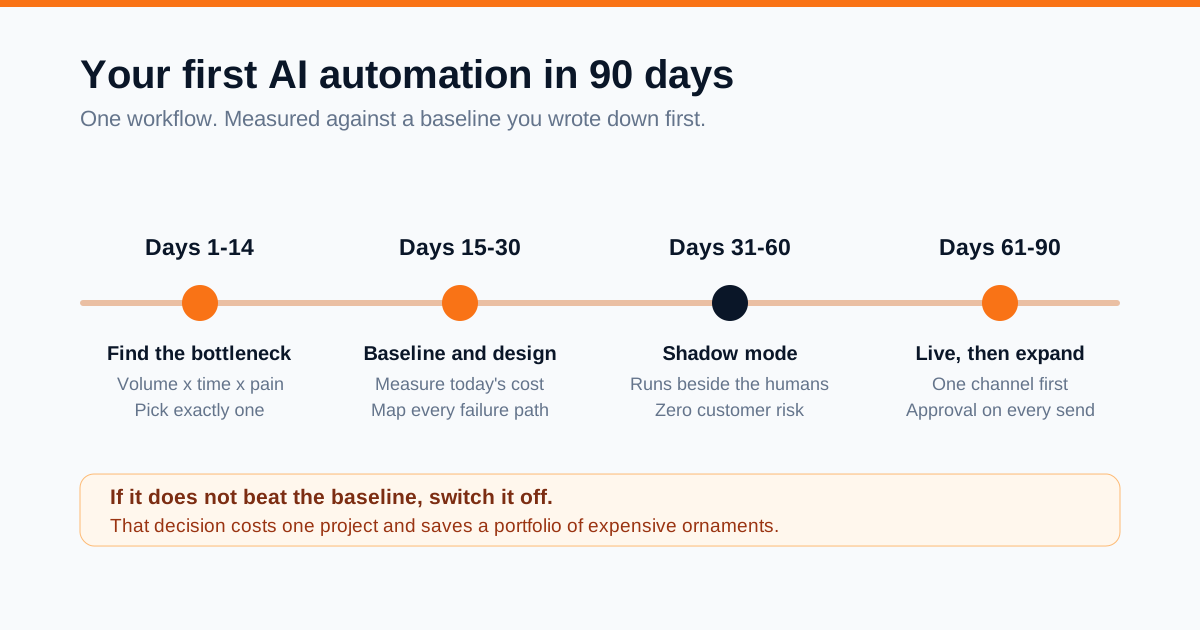
Days 1–14 - find the bottleneck. List every recurring task involving unstructured information, with frequency, minutes per instance, owner, and what breaks when it is late. Score on volume × time × pain, then filter for clear inputs and outputs, tolerance for occasional error, API access, and a measurable metric. Pick one. The first project's real job is teaching your team how this works.
Days 15–30 - baseline and design. Measure the current state properly and record it in writing. Then design the workflow on paper: every step, branch and failure path, which steps genuinely need a model, the confidence threshold, and what happens below it.
Days 31–60 - build in shadow mode. Run the automation alongside the humans without acting on its output. Compare daily. Shadow mode is the highest-value practice in this guide: it surfaces edge cases with zero customer risk, produces your evaluation set from real data, and builds trust through evidence rather than assertion. Two to three weeks is usually enough.
Days 61–75 - limited live release. Go live on one channel, region or category, with human approval on every outbound action. Review daily, then weekly.
Days 76–90 - expand, or stop. Widen gradually, relaxing approval only where your logs justify it. Measure against the baseline and write up the result honestly. Be willing to switch it off if it does not beat the baseline - that decision costs one project and saves a portfolio of expensive ornaments.
The future of AI automation
Forecasting specifics here is a good way to look foolish in eighteen months, but some directions are visible in how systems are already being built.
Falling cost per unit of capability. The trend has been strongly downward for a given capability level. Workflows that are marginal today become obviously worthwhile at a fraction of the price - so design for easy model swapping and benefit automatically.
Standardised tool connectivity. Bespoke glue between every model and every system is giving way to open protocols. Invest in clean, well-described tool interfaces rather than model-specific integrations.
Longer-horizon, more reliable agents. Reliability across multi-step tasks is where the frontier is moving. Expect the boundary of "safe to run unsupervised" to shift outward - and expect it to remain a boundary. Oversight gets reallocated, not eliminated.
Multimodal as default. Voice, images and documents handled natively alongside text. Phone calls become as automatable as emails, reopening a large category of work.
Small specialised models closer to the edge, handling narrow high-volume tasks, with frontier models reserved for genuinely hard reasoning. Most mature systems will route between several models by task.
Regulation maturing into a build requirement. Documentation, disclosure, audit trails and human-override paths move from good practice to procurement checklist.
Advantage moving to process and data. As models commoditise, everyone accesses similar intelligence. What they cannot access is your customer history, operational knowledge and feedback loops. The differentiator is not which model you use - it is how well your business is organised for one to be useful.
The businesses that do well here are not the fastest adopters. They are the ones that pick real bottlenecks, measure honestly, keep humans on the decisions that matter, and improve one workflow at a time.
Frequently asked questions
What is AI automation in simple terms?
Using AI inside an automated process so that steps needing judgment or language happen without a person. A trigger fires, the AI interprets or generates something, and the result is written into a real system automatically.
How is AI automation different from regular automation?
Regular automation follows rules you write and needs structured input. AI automation handles unstructured input - emails, calls, documents - and makes judgment calls you could not express as rules. Regular automation is deterministic and free to run; AI automation is probabilistic and costs money per run. Good systems use both.
Do I need to know how to code?
Not for a first workflow. Zapier and Make let you build capable automations visually. Coding matters at high volume, with complex logic, or when self-hosting is required for data reasons.
What should my first AI automation be?
Something high-frequency, low-risk and measurable - enquiry classification and routing, call summarisation, or document extraction. Avoid anything customer-facing and irreversible on the first project.
How much does AI automation cost?
Three separate lines: a one-off build dominated by integration effort, platform subscriptions, and model usage that scales with volume. Model cost per run is often cents; build and platform usually dominate at typical business volumes.
Is AI automation reliable enough for real business use?
For the right tasks with the right guardrails, yes. Reliability comes from the engineering around the model - structured outputs, schema validation, confidence thresholds, deterministic guardrails and human review on consequential actions.
Will AI automation replace jobs?
It reliably replaces tasks - copying data, tagging, first-draft writing, summarising. Whether that becomes headcount reduction is an organisational decision, not a technical inevitability. Most implementations absorb growth without adding people.
What is an AI agent, and do I need one?
An agent is given a goal and tools and decides its own steps. Most business tasks do not need one - a fixed workflow with AI steps is cheaper, faster and easier to debug. Use agents for open-ended work, with step budgets, spend caps and approval gates.
Which is better: Zapier, Make or n8n?
Zapier for the broadest app support and non-technical users. Make for complex visual logic at better per-operation value. n8n for self-hosting, data control and predictable cost at volume. Many teams run more than one.
Can I use ChatGPT or Claude for business automation?
Yes - through their APIs, which is what makes them programmable components rather than chat windows. The chat interfaces are for exploration; the API runs in production, with structured outputs, tool calling and business-tier data terms.
Is my data safe with AI providers?
It depends on the plan. Business and enterprise API tiers generally commit to not training on your data and offer retention controls; consumer tiers can differ. Read your specific terms, minimise what you send, and keep regulated data on a stricter path.
What is prompt injection and should I worry about it?
It is when text your system reads contains instructions aimed at your model. Worry if your workflow both reads untrusted content and has tools that can act. Defend by treating retrieved content strictly as data, allowlisting destinations, keeping tools least-privileged, and requiring approval for irreversible actions.
How long does it take to see results?
A focused first workflow typically takes two to six weeks to build plus two to three weeks in shadow mode. Measurable results usually appear within the first month live, provided you recorded a baseline.
How do I measure ROI properly?
Not by hours saved alone. Track response time, conversion by response-time band, coverage of previously-skipped work, error rates and cost per processed unit - each against a baseline recorded before building.
When should I not use AI automation?
When volume is very low, when the process changes constantly, when the underlying process is broken, when the task needs exact reproducibility, or when every output would require full human verification anyway.
Ready to put this into practice?
We design and implement AI automation end to end - enquiry triage, WhatsApp and chat automation, CRM workflows, document processing, follow-up systems and reporting - with the guardrails, logging and human oversight described in this guide built in from day one.
We start with a short discovery call to identify the bottleneck worth automating first, and we will tell you honestly if automation is not the right answer for it.
Explore our AI Automation services, see what the packages include, or get in touch to discuss your workflow.