
WhatsApp Marketing for Indian Businesses: How to Turn Chats Into Orders
Ask an Indian business owner where their orders actually close and almost none of them will say their website. They will say WhatsApp. The enquiry might have started on Instagram, Google or a hoarding, but the negotiation, the photos, the rate, the delivery date and the payment screenshot all happened in a chat window.
Which makes it odd how little thought most businesses put into it. The number is a personal account. Replies happen whenever someone remembers. There is no catalogue, no saved replies, no record of who asked what. The most important sales channel in the business is the one nobody is managing.
This guide is about fixing that. Not with expensive software - most of it is free and takes an afternoon.
What's in this guide
- 1Why WhatsApp converts better than anything else in India
- 2Business App or Business API: which one you need
- 3Setting it up properly in one afternoon
- 4Building a list without buying numbers
- 5Broadcast lists, not groups
- 6The six-message order script
- 7What to send, and how often
- 8Follow-up: the part almost everyone skips
- 9Rules that keep you from getting blocked
- 10What to measure
- 11A worked example: a Kanpur packaging supplier
- 12Frequently asked questions
Why WhatsApp converts better than anything else in India
There are around half a billion WhatsApp users in India. That is not the interesting part - reach alone never is. The interesting part is what happens after a message lands.
Marketing emails in India get opened somewhere around a fifth of the time, often less. A WhatsApp message from a saved contact gets read almost every time, usually within minutes. It arrives in the same list as messages from family and colleagues, and it does not compete with a promotions tab.
There are three practical reasons it converts:
It is a conversation, not a broadcast. The buyer can ask 'is this available in blue' and get an answer in ninety seconds. Every other channel makes them wait or fill a form.
Everything a buyer needs fits in the window. Photos of actual stock, a video of the item working, a voice note explaining the difference between two options, a rate list, a payment link. No downloads, no logins.
Trust transfers. A number saved as 'Sharma Traders' with a profile photo, a catalogue and business hours reads as a real business. An unsaved number reads as a risk.
The flip side is that WhatsApp is unforgiving of bad behaviour. Send unwanted messages and people block you, and blocks damage your account far more directly than a low email open rate ever did. Everything in this guide assumes you are messaging people who chose to hear from you.
Business App or Business API: which one you need
This is the first fork in the road and most businesses get talked into the expensive option far too early.
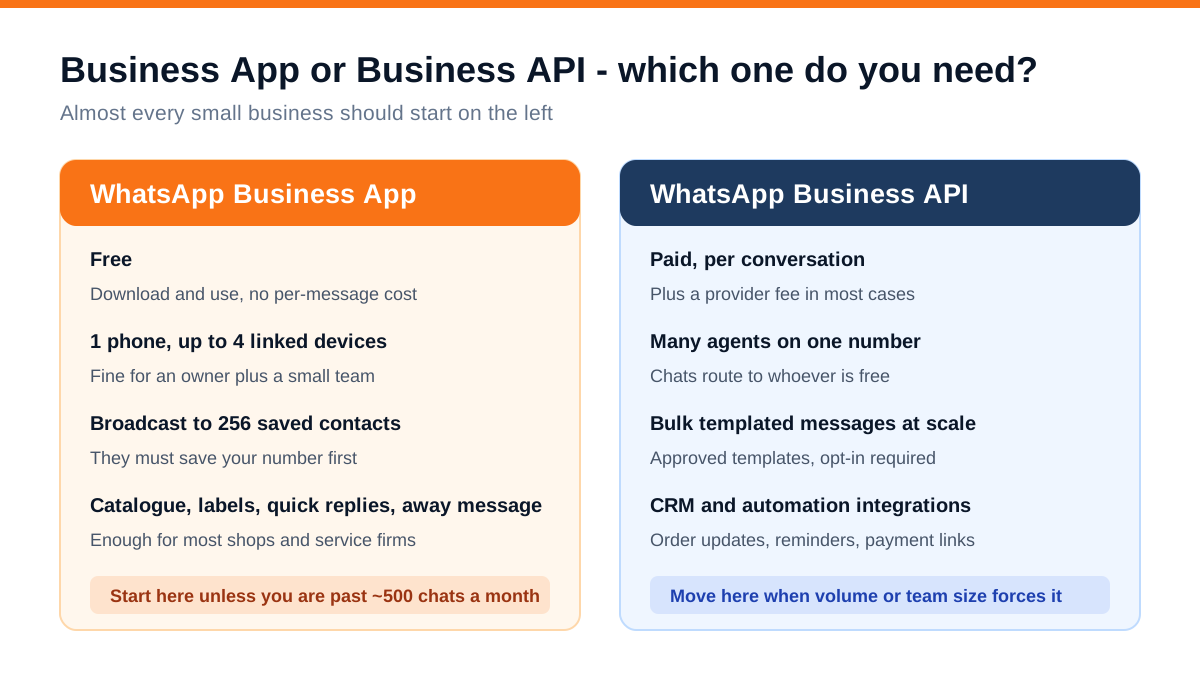
WhatsApp Business App is free, works on one phone with up to four linked devices, and includes a catalogue, labels, quick replies, greeting and away messages, and broadcast lists of up to 256 saved contacts. For a shop, a clinic, a service firm or a small manufacturer, this is genuinely enough.
WhatsApp Business API costs money per conversation, needs a provider, and requires approved message templates. What it buys you is many agents answering one number, bulk templated messaging at scale, and integration with a CRM so order updates and reminders go out automatically.
The honest rule of thumb: stay on the free app until you are either past roughly 500 chats a month or you have more than two people who need to answer the same number. Below that, the API adds cost and process without adding orders.
One thing worth doing early either way: get the green verified tick if you qualify. It is not essential, but for higher-ticket purchases it removes a real hesitation.
Setting it up properly in one afternoon
The setup is what separates a business number from a personal number that happens to receive business messages.
Use a dedicated number. Not the owner's personal number. When the owner travels, the business should not go quiet, and when an employee leaves, the customer list should not leave with them.
Complete the business profile. Name exactly as customers know you, category, address if you have a shop, business hours, email and website. The profile is the first thing a new contact taps.
Build the catalogue. This is the most underused feature in WhatsApp Business. Add your products or services with a photo, a name, a price or price range, and a short description. When someone asks 'what all do you have', you send a catalogue link that opens instantly instead of a PDF that never gets downloaded.
Write your quick replies. Set up shortcuts for the five things you type every day: your rate range, your delivery timelines, your payment details, your address with a location pin, and your 'send me your requirement' message. This alone can halve your response time.
Set the greeting and away messages. The greeting should not be 'Welcome to our business'. Make it useful: 'Thanks for messaging Shreeji Packaging. Send us the size and quantity you need and we'll share rates within the hour. Office hours 10am to 7pm, Mon to Sat.'
Use labels. New enquiry, quote sent, negotiating, order placed, delivered, repeat customer. Labels are a free CRM and they are the only way you will remember to follow up on the seventeen conversations sitting half-finished in your inbox.
Put a click-to-chat link everywhere. A wa.me link with your number opens a chat directly. It belongs on your website, your Instagram bio, your Google Business Profile, your invoices and your visiting card.
Building a list without buying numbers
Let us be clear about this because it is the single most common mistake: do not buy databases of numbers. Bulk messaging strangers gets you blocked, gets your number reported, and produces near-zero orders. It also makes you look exactly like the spam your own customers complain about.
The list you want is built from people who already raised a hand:
- Everyone who has ever messaged you. They are already in your chats. Label them and they become your list
- Walk-in customers. Ask at billing: 'Shall I send the warranty details on WhatsApp?' Almost nobody says no, and now you have consent and a number
- Your website. A WhatsApp button on every page beats a contact form for most Indian businesses. Forms feel like effort; a chat feels like asking a question
- Instagram and Facebook. Move enquiries off social platforms and into WhatsApp deliberately. This is the handoff described in our Instagram marketing guide
- Click-to-WhatsApp ads. If you run paid campaigns, sending the click straight into a chat rather than a landing page usually costs less per genuine enquiry
- A reason to opt in. A rate list, a seasonal offer, a stock-availability alert. Give people something specific in exchange for permission
Always ask them to save your number. A broadcast message only reaches contacts who have you saved. Make it the last line of your first reply: 'Please save this number so our rate updates reach you.'
Broadcast lists, not groups
Business owners default to groups because they are easier to create. Groups are the wrong tool and they cost you customers.
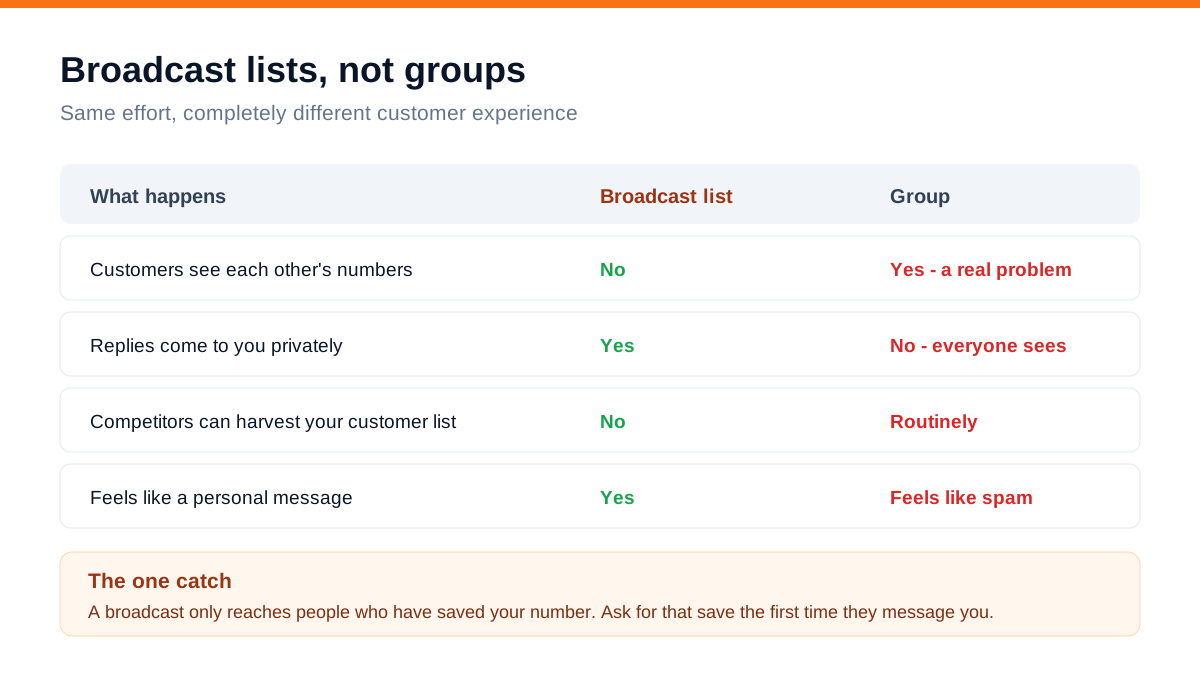
In a group, every customer sees every other customer's number - which means your competitor joins once and walks away with your entire buyer list. Replies are public, so one annoyed person's complaint is read by two hundred others. And people mute business groups within a day.
A broadcast list sends the same message individually. The recipient sees a normal one-to-one message. They reply to you privately. Nobody sees anybody else. It is more work to set up once and better in every way afterwards.
Practical points:
- Keep separate lists by type: new enquiries, existing customers, dealers, dormant buyers. The message should differ for each
- 256 contacts per list on the free app. Beyond that, make list 2, list 3, and so on
- Recipients must have your number saved. This is the whole reason you keep asking them to save it
- Send broadcasts at sensible hours. 8pm on a weekday performs well in most consumer categories; 11am to 4pm for B2B
The six-message order script
Most businesses improvise every conversation. A script is not about sounding robotic - it is about not losing deals because you were busy and typed something lazy.
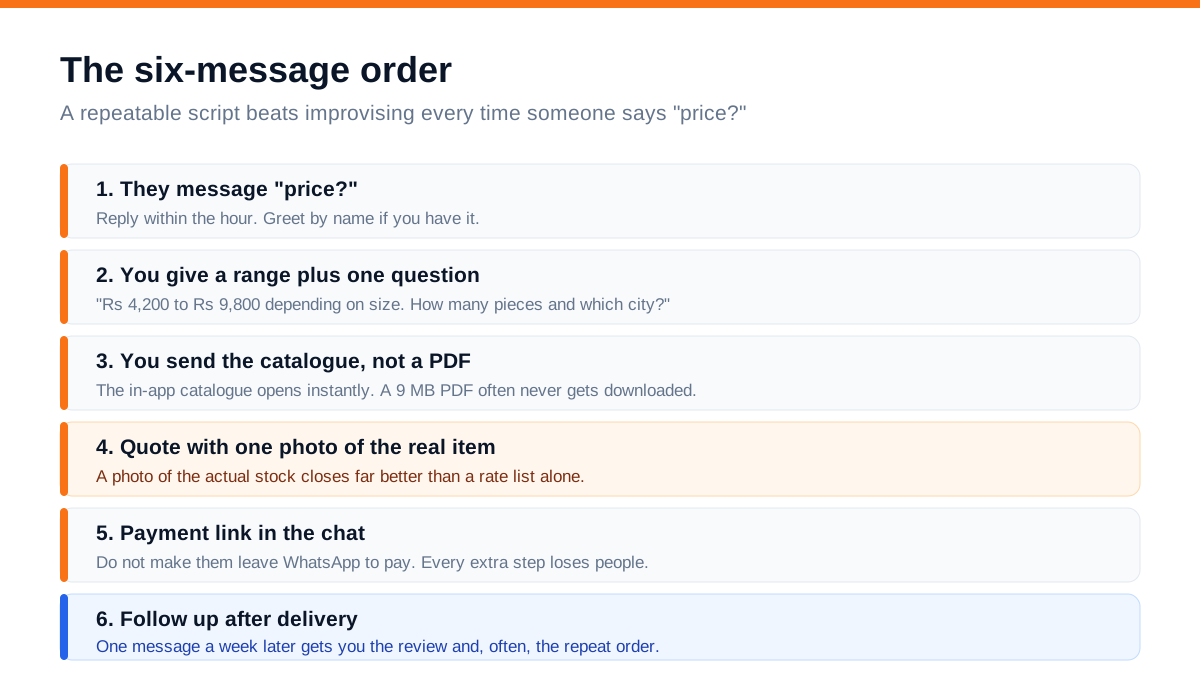
Message 1 - they say 'price?'. That is what most Indian WhatsApp enquiries look like. Nothing else. Reply within the hour during business hours; response speed is the highest-leverage variable in the entire funnel, exactly as it is in online lead generation generally.
Message 2 - a range plus one question. Never send a bare number and never send four questions. 'Rs 4,200 to Rs 9,800 depending on size. How many pieces and which city?' The range gives them something to react to; the question tells you whether this is real.
Message 3 - the catalogue. Send the in-app catalogue link, not a heavy PDF. If they named a specific item, send that item's card directly.
Message 4 - the quote, with a photo of the actual stock. Not a stock image, not a rendering. A photo of the real thing, taken on your phone, closes noticeably better than a rate list alone. Include the price, what is included, delivery time and payment terms in one message so they can forward it to whoever decides.
Message 5 - the payment link, inside the chat. Do not send them to a website to pay. Every step you add loses people. If you take advance payments, this is also where you send your bank details.
Message 6 - after delivery. 'Received everything alright? If the size works, I'll note it for your next order.' This one message is where reviews and repeat orders come from, and it is the one almost nobody sends.
Save messages 2, 3 and 5 as quick replies. You will use them several times a day.
What to send, and how often
Once you have a list, the temptation is to message it constantly. Resist. WhatsApp is a permission channel, and the cost of overuse is being blocked, not just ignored.
A sustainable rhythm for most Indian businesses is two to four broadcasts a month, mixed like this:
- New stock or new service. Photo, price, one line, 'reply STOCK for details'
- Genuinely useful information. Care instructions, a seasonal warning, a compliance deadline in your industry, a price-change heads-up before it happens
- A real offer with a real end date. Not permanent discounts, which just retrain people to wait
- Festival and seasonal messages that are actually relevant to what you sell. A generic Diwali greeting from a bearing supplier is noise; 'Diwali dispatch closes on the 8th, order by then' is useful
Rules for every broadcast: one clear point per message, a photo or short video where it helps, under about eighty words, and one instruction at the end. If it takes three paragraphs to explain, it belongs on your website with a link.
Follow-up: the part almost everyone skips
Go and look at your WhatsApp right now. Count the conversations where you sent a quote and the customer never replied. For most businesses that number is between thirty and a hundred.
Those are not dead. Most of them got busy, or were comparing, or were waiting for someone else to approve. A single well-timed message recovers a meaningful share of them.
A follow-up sequence that works without being annoying:
- 1Day 2 after the quote - 'Just checking you received the rates. Any questions on the sizes?'
- 2Day 7 - add value rather than pressure: send a photo of a similar order you dispatched, or mention stock availability
- 3Day 21 - a soft close with a reason: 'Rates are revising next month, happy to hold the current price if you confirm this week'
- 4Then stop. If there is no response after three, move them to a dormant label and include them only in general broadcasts
The same discipline applies after a sale. A message a week after delivery, and another before their likely reorder date, is how a one-time buyer becomes a regular. In most Indian small businesses, repeat customers are cheaper to sell to than any advertising channel, and WhatsApp is the only channel that reaches them reliably.
Rules that keep you from getting blocked
Blocks and reports are the real risk here, and they compound. Enough of them and WhatsApp restricts or bans the number, taking your entire customer history with it.
- Only message people who gave you permission. No purchased lists, no scraped numbers, no adding people to groups without asking
- Make opting out easy and honour it immediately. 'Reply STOP to stop receiving updates.' One person leaving quietly is far cheaper than one person reporting you
- Do not message at odd hours. Nothing before 9am or after 9pm
- Do not send the same message twice. People notice, and it reads as automated
- Keep a backup. Turn on chat backup so a lost phone does not erase years of customer conversations
- Use a business number you own, registered to the business, not to an employee
If you do move to the API later, these stop being etiquette and start being enforced policy, with template approval and quality ratings attached. Building the habit now costs nothing.
What to measure
WhatsApp does not hand you a dashboard, so track these manually or in your CRM. Five numbers are enough:
- 1New conversations started per week. This tells you whether your other channels are actually feeding WhatsApp
- 2Median first-response time. If it is over an hour during business hours, fix this before anything else on the list
- 3Quote-to-order rate. Of every ten quotes sent, how many became orders? Under two and the problem is usually the quote itself or the absence of follow-up
- 4Broadcast reply rate. Replies, not delivered counts. Under 2% means the message was not worth reading
- 5Blocks and opt-outs after each broadcast. A rising number is the clearest signal you are sending too often
A worked example: a Kanpur packaging supplier
A corrugated box supplier came to us doing about Rs 9 lakh a month, with everything running through the owner's personal WhatsApp. No catalogue, no labels, replies whenever he was free - sometimes next day.
We changed five things:
- A dedicated business number with a complete profile and business hours
- A catalogue of 34 box sizes with price-per-piece slabs
- Five quick replies covering rates, MOQ, delivery time, payment details and location
- Labels on every chat, with a rule that the 'quote sent' label gets reviewed every Monday
- One broadcast a fortnight to 610 saved contacts across three lists
No advertising spend changed. Over four months, median first-response time went from about six hours to twenty-two minutes. The Monday follow-up on stale quotes alone produced 38 recovered orders in that period. Repeat order rate went from roughly 31% to 49%, and monthly revenue moved to about Rs 14.5 lakh.
Nothing there was clever. It was a catalogue, five saved messages and someone actually replying.
WhatsApp does not need a strategy so much as it needs a system. Reply fast, send proof, follow up once, and ask people to save your number.
Frequently asked questions
Is WhatsApp marketing legal in India?
Yes, when you message people who have given you permission. What is not acceptable - and what gets numbers banned - is bulk messaging purchased or scraped databases. WhatsApp's own Business Policy requires opt-in, and India's data protection rules point the same way. Build a list from your own customers and enquiries and you are on safe ground.
Do I need the paid WhatsApp Business API?
Most small businesses do not. The free Business App handles catalogues, labels, quick replies and broadcasts to 256 saved contacts, which covers a business handling a few hundred conversations a month. Move to the API when several people need to answer the same number simultaneously, or when you want automated order and payment updates from a CRM.
How many messages can I broadcast at once?
On the free Business App, 256 contacts per broadcast list, and only to people who have saved your number. You can create multiple lists to cover a larger base. On the API there is no practical list cap, but every message must use an approved template and recipients must have opted in.
How often should I message my WhatsApp list?
Two to four times a month for most businesses. More than weekly and opt-outs climb sharply unless you genuinely have something new each time. The right test is simple: would a customer be glad they got this message? If you have to think about it, do not send it.
Should I use WhatsApp or Instagram for my business?
Both, for different jobs. Instagram finds people who have never heard of you. WhatsApp converts them and keeps them. If you only have time for one and you already have some customer base, WhatsApp usually produces revenue faster because you are selling to people who already know you.
What is the best way to get customers to save my number?
Ask directly, and give a reason. At billing: 'Save this number and I'll send your bill and any offers on WhatsApp.' In your first chat reply: 'Please save this number so our rate updates reach you.' Sending something genuinely useful in the first week - a rate list, a care guide - makes the save stick.
Where to start this week
If you do nothing else from this guide, do three things. Build the catalogue. Write five quick replies. Go through your chats and follow up on every quote that never got an answer.
Those three take about three hours and, in our experience, they move revenue faster than any new marketing channel you could start instead.
Once that is running, the bigger wins come from feeding WhatsApp properly - getting more of the right people to message you in the first place. That is what our lead generation and social media marketing work is built around, and our packages list what each costs. If you want to talk through what fits your business, get in touch.