
Google Business Profile: The Features Almost Nobody Uses (And the Review System That Works)
Google Business Profile is the most valuable free thing available to an Indian local business, and the average profile uses perhaps a third of it.
Name, address, phone, hours. Maybe six photographs, three of them blurry, uploaded in 2022. That is where most profiles stop - and it is enough to exist, but not enough to be chosen.
This guide is about the other two-thirds. Not the setup basics, which our local SEO and Google Business Profile guide covers, and not the ranking mechanics, which are in our Google Maps pack guide. This is about the features sitting empty in your profile right now, and the review system that matters more than all of them combined.
What's in this guide
- 1The gap between what exists and what gets used
- 2Photos: the most underrated field
- 3Q and A: the section competitors can edit
- 4Posts, products and services
- 5Messaging, booking and calls
- 6A review habit that actually holds
- 7How to reply to a bad review
- 8What the performance report tells you
- 9Mistakes that quietly cost you customers
- 10A worked example: a two-chair salon
- 11Frequently asked questions
The gap between what exists and what gets used
Across the local profiles we audit, the pattern is remarkably consistent.
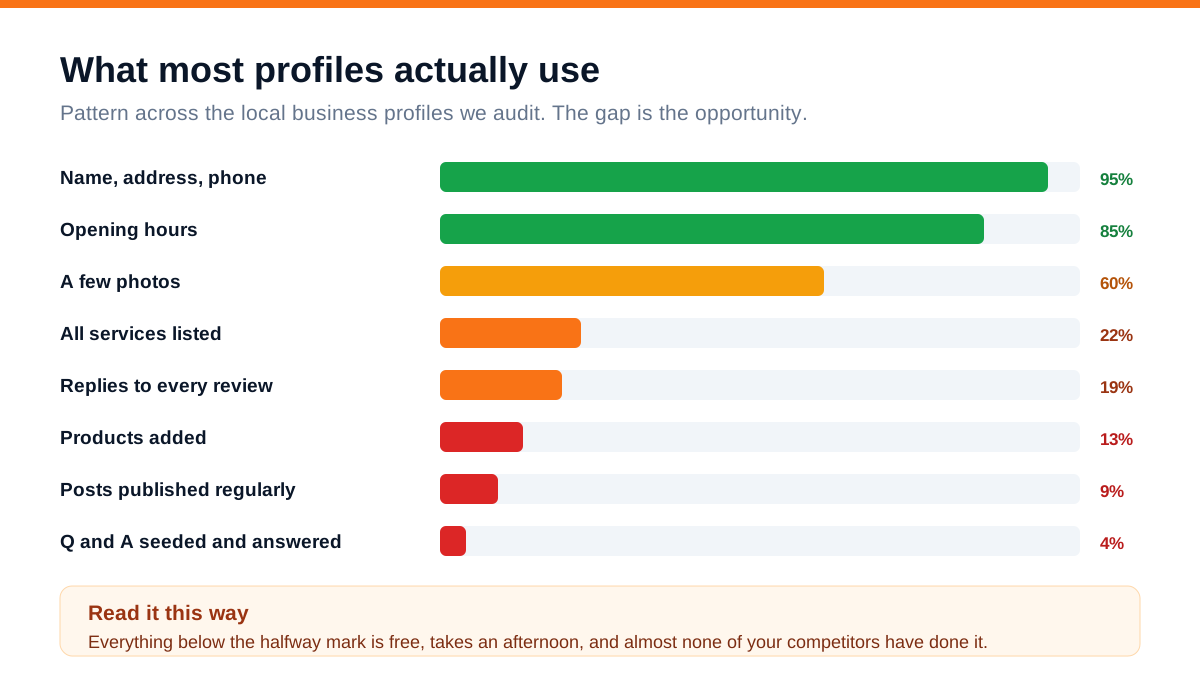
Nearly everyone gets the basics in. Photos are patchy. And then it falls off a cliff: about a fifth have all their services listed, fewer reply to every review, roughly one in eight has added products, under one in ten posts regularly, and almost nobody has touched the Q and A section.
That gap is the opportunity, and it is unusual in marketing because it costs nothing. There is no auction, no monthly fee, no agency required. An afternoon of work puts your profile ahead of most of the businesses you compete with.
The reason it stays empty is not difficulty. It is that nobody ever told business owners these fields exist, because Google does not advertise them and the profile does not nag you to fill them in.
Photos: the most underrated field
Photographs do more work on a local profile than anything except reviews, and most businesses treat them as decoration.
What actually matters:
- Quantity, kept current. Aim for thirty or more, and add a few every month. Profiles with fresh photographs get noticeably more engagement than static ones
- The exterior, from the road, in daylight. People use this to find you. A shot from the angle a customer approaches from is worth more than a flattering one
- The interior, and the parking. Both remove hesitation, particularly for clinics, salons and showrooms
- Your actual work. Finished jobs, products in use, the workshop mid-job. This is what people scroll through
- Your team, faces visible. Small businesses win on trust and this is where trust starts
- Real photographs, not stock images. Stock reads as false immediately and reduces trust rather than building it
Two practical points. First, customers upload photographs too, and theirs appear alongside yours - so the impression is partly out of your hands, which is another reason to keep adding your own. Second, geotagging photographs makes no measurable difference; ignore anyone selling that service.
The habit worth building: one photograph a week from your phone, uploaded on the spot. Over a year that is fifty genuine images and a profile that looks alive.
Q and A: the section competitors can edit
This is the feature almost nobody knows about, and the only one where inaction has a real downside.
The Q and A section on your profile can be answered by anyone. Not just you. A confused customer, a former employee, a competitor. Whatever gets voted useful rises to the top and appears prominently on your listing.
We have seen a manufacturer's profile where the top answer to 'do they deliver outside the city' was a stranger's 'No, only local' - which was wrong, and had been sitting there for months costing them enquiries.
What to do, in about twenty minutes:
- 1Check what is already there. You may find questions nobody told you about, answered wrongly
- 2Post your own questions and answer them. This is explicitly allowed. Seed the eight to ten questions customers actually ask - price range, timings, home delivery, parking, payment methods, warranty, whether you serve a particular area
- 3Write answers as full, useful sentences, because they get read as content, not just as answers
- 4Turn on notifications so you hear when someone asks something new, and answer within a day
- 5Upvote your own correct answers so they stay at the top
This costs nothing and directly prevents a category of lost enquiry that most owners never even discover is happening.
Posts, products and services
Three sections that reward small, regular effort.
Services. Every service listed individually, with a short description each. This is the biggest relevance signal after your category, and most profiles have three entries where the business offers fifteen. If you do only one thing from this guide, do this one.
Products. Even for service businesses, product entries display as visual cards on your listing and take up real space in search results. Add your main offerings with a photograph, a name, a price or range, and a line of description. Roughly one in eight local businesses bothers, which makes it cheap differentiation.
Posts. Short updates that appear on your profile - offers, new stock, seasonal notes, a finished project. They expire after a week or so, which is why consistency matters more than polish. Weekly is plenty, and ten minutes covers it. The direct ranking benefit is modest; the benefit of looking like a business that is currently trading is not.
What to post, when you cannot think of anything: a photograph of this week's work with two lines about it. That is a complete post and it performs better than a designed graphic with marketing language.
Messaging, booking and calls
The action buttons are where the profile stops being a listing and becomes a lead source.
Messaging lets people chat with you directly from your listing. Only enable it if you will genuinely reply within a few hours - Google shows your typical response time, and a slow one is worse than not offering it. For most Indian businesses, sending people to WhatsApp works better, because that is where the conversation would end up anyway.
Booking integrates with appointment systems for salons, clinics and services. If you use a supported system, connecting it removes a step from the customer's path.
Call tracking, carefully. You can use a tracking number as the primary phone provided your real number is also listed, but inconsistent numbers across directories cause more harm than the tracking data is worth for most small businesses. Unless you are running significant paid campaigns, use your real number.
Hours, including holidays. Special hours for festivals matter more in India than most guides acknowledge. A customer who drives to a closed shop during Diwali week leaves a one-star review, and it is entirely preventable.
A review habit that actually holds
Reviews are the single largest factor in whether someone chooses you over the business next to you in the results. And almost every business approaches them as an occasional campaign rather than a routine.
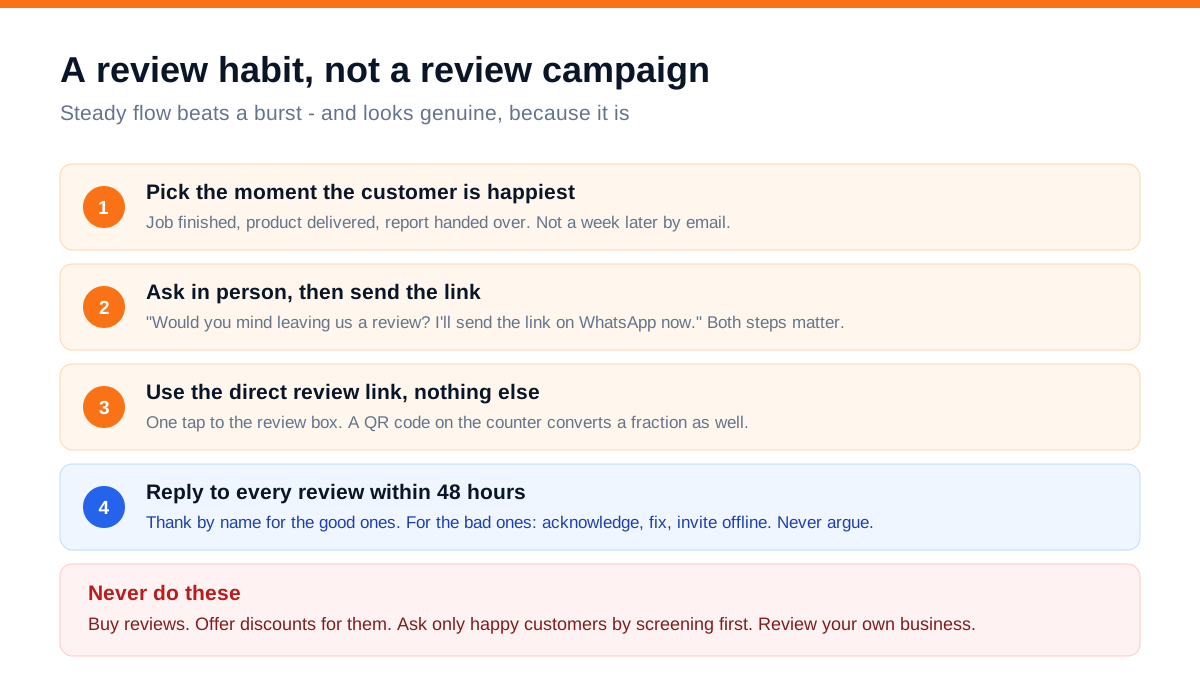
Ask at the moment they are happiest. Job finished, product delivered, report handed over. Not a week later by email, when the feeling has faded.
Ask in person, then send the link. 'Would you mind leaving us a review? I'll send the link on WhatsApp now.' Both halves matter - the verbal ask creates the obligation, the link removes the friction. Doing only one of the two roughly halves the response.
Use the direct review link. Google provides one from your profile that opens the review box in one tap. A QR code on the counter converts at a fraction of the rate.
Make it somebody's job. The person who finishes the interaction - the technician, the receptionist, the delivery driver - should be the one who asks. Central marketing campaigns to collect reviews consistently underperform a habit at the point of service.
Aim for steady, not sudden. Four or five a month, every month, is worth far more than forty in one week. Bursts look manufactured and can get filtered out entirely.
Never buy them, never incentivise them, and never screen for happy customers first. All three are against Google's policies, all three are detectable, and the downside is a suspended profile with your existing reviews gone.
How to reply to a bad review
Every business gets one eventually. How you reply is read by everyone who comes after.
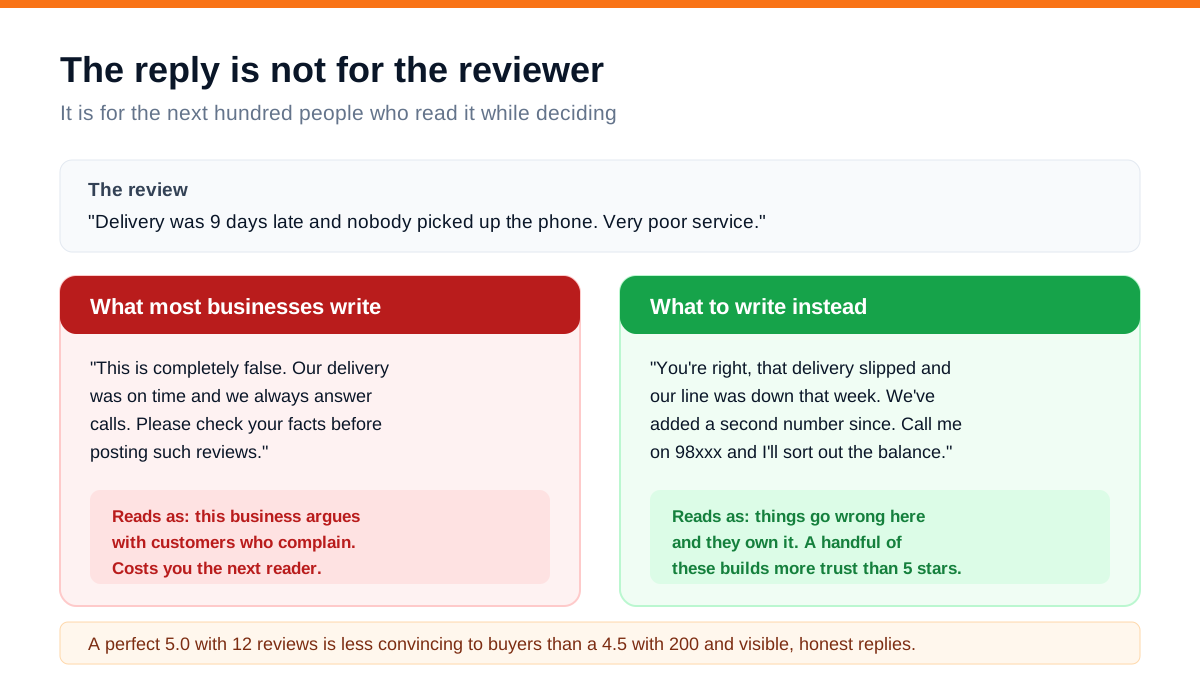
The instinct is to defend yourself, and it is always the wrong instinct. A reply that argues tells every future reader that complaining to this business is unpleasant.
The structure that works: acknowledge what happened, say what has changed, and invite them to contact you directly. Short, specific, no defensiveness, and no marketing language. If the complaint is factually wrong, you can correct it - calmly, in one clause, without accusation.
Three further points:
Reply to the positive ones too. By name, referencing what they bought. It takes thirty seconds and it shows the profile is attended to.
Reply within forty-eight hours. Later than that and it reads as an afterthought.
A perfect rating is not the goal. A 5.0 from twelve reviews is less convincing to an experienced buyer than a 4.5 from two hundred with visible, honest replies. A handful of imperfect reviews handled well is a trust signal, not a problem.
You can request removal of reviews that genuinely violate policy - spam, hate speech, obvious fakes from people who were never customers - but do not expect it for reviews that are merely unfair. Reply well instead; it works better anyway.
What the performance report tells you
The performance section of your profile is real behavioural data and most owners never open it.
What to look at monthly:
- 1Searches that showed your profile, split between people looking for your business name and people looking for your category. A rising category share means your relevance work is landing
- 2The actual search terms people used. This is a free keyword list drawn from real customers, and it should shape your services list and your website pages
- 3Calls, and when they happen. If most calls come at 7pm and you close at 6, that is worth knowing
- 4Direction requests. The strongest signal of genuine local intent
- 5Website clicks. If these are high but enquiries are low, the problem is your website rather than your profile
- 6Photo views compared with similar businesses, which Google shows you - a rough but useful benchmark
Judge the profile on calls and direction requests, not on where you think you rank. Rankings shift with the searcher's location; these numbers do not lie.
Mistakes that quietly cost you customers
- Keywords in the business name. 'Sharma Dental Best Clinic Kanpur' is against the rules and is the most common cause of suspension, whatever your competitors appear to get away with
- Wrong or unmaintained hours, especially around festivals
- An unclaimed profile. Google creates listings automatically. If you have never verified yours, someone else could
- Duplicate listings left over from an old agency or a previous address, splitting your reviews across two profiles
- Ignoring the Q and A section, where a wrong answer can sit for months
- Never posting, so the profile looks abandoned
- Not replying to reviews, which is visible and reads as indifference
- Letting the website link point at your home page rather than at a page about that specific location or service
A worked example: a two-chair salon
A salon with two chairs and one location. Profile claimed, 4.3 rating from 31 reviews, nine photographs, hours listed, one service entry reading 'Salon'. Roughly 40 calls a month from the listing.
The work took one afternoon plus a habit:
- Primary category changed from 'Beauty salon' to 'Hair salon' after checking what the businesses ranking above were using, with three relevant secondary categories added
- All 22 services listed individually with price ranges and short descriptions
- Nine products added - the retail range they sell at the counter, with photographs and prices
- Forty-one photographs uploaded: the shop front from the road, the interior, each stylist, and before-and-after work
- Eleven questions seeded and answered in the Q and A - walk-ins accepted, parking, timings, bridal packages, home service area, payment methods
- A review habit: the stylist asks at the chair while the customer is looking in the mirror, and sends the link on WhatsApp before they leave
- One post a week, usually a photograph of that week's work
After four months: 147 reviews at 4.6. Calls from the listing rose from about 40 a month to 173. Direction requests went from 88 to 402. Bookings attributable to the profile roughly tripled.
Total spend: nothing. The only ongoing cost was the ten seconds it takes a stylist to ask.
Google Business Profile is the rare thing in marketing where the work costs nothing and most of your competitors have not done it. That combination does not last forever.
Frequently asked questions
Is Google Business Profile really free?
Yes, entirely. Every feature described here - photos, services, products, posts, Q and A, messaging, the performance report - costs nothing. Google makes money from advertising alongside local results, not from the profiles themselves. Anyone charging you a fee to keep your profile active or verified is not associated with Google.
How many photos should I add to my Google Business Profile?
Aim for at least thirty, and keep adding a few every month. Cover the exterior from the road in daylight, the interior, parking, your team with faces visible, and your actual work. Use real photographs rather than stock images - stock reads as false and reduces trust. A photograph a week from your phone is a sustainable habit.
Can competitors answer questions on my Google profile?
Yes. The Q and A section can be answered by anyone, and whichever answer gets voted most useful appears prominently on your listing. This is why you should seed and answer the eight to ten questions customers actually ask yourself, turn on notifications for new questions, and check the section periodically for wrong answers.
How do I get more Google reviews?
Ask in person at the moment the customer is happiest, then immediately send the direct review link on WhatsApp. Make it the job of whoever finishes the interaction rather than a central marketing campaign. Aim for a steady four or five a month rather than a burst - sudden clusters look manufactured and can be filtered out.
Should I reply to negative reviews?
Always, within forty-eight hours. Acknowledge what happened, say what has changed, and invite the person to contact you directly. Never argue, even when the review is unfair, because the reply is read by every future customer rather than by the reviewer. A few imperfect reviews handled calmly build more trust than a flawless rating.
How often should I post on Google Business Profile?
Weekly is plenty, and it takes about ten minutes. Posts expire after roughly a week, so consistency matters more than polish - a photograph of this week's work with two lines about it is a complete post. The direct ranking benefit is modest, but a profile with recent activity clearly reads as a business currently trading.
Where to start
Open your profile today and do two things: count how many services are listed, and check the Q and A section. For most businesses the first number is far too low and the second is either empty or contains something wrong. Both are free to fix and both take under an hour.
Then set up the review habit this week. Decide who asks, at what moment, and get the direct review link saved on their phone. That single operational change does more for local visibility than anything else on this page.
Our Google Business Profile service covers full optimisation, Q and A seeding, posting and review systems, including multi-location setups, and the packages page shows what it costs. If you want to know what is missing from your profile specifically, send us your business name and we will look at it and tell you.