
9 Google Ads Mistakes Quietly Wasting Your Budget (And How to Fix Each)
We audit a lot of Google Ads accounts. Some belong to businesses running things themselves, some were handed over by a previous agency, and a few were built by us years ago and left alone too long.
The findings are remarkably consistent. In a typical unmanaged account, somewhere between a quarter and a half of the spend is producing nothing at all - and it is almost never because the business chose bad keywords. It is because of a handful of settings and habits that go unnoticed while the money leaves.
Here are the nine we find most often, roughly in order of how much they cost, with the fix for each and how long it takes.
Table of contents
- Where the waste actually goes
- 1. No negative keywords
- 2. Broad match too early
- 3. Everything lands on the homepage
- 4. No conversion tracking
- 5. Optimising for clicks
- 6. Panic edits
- 7. One giant ad group
- 8. Ignoring geography and schedule
- 9. Nobody answers the leads
- A 30-minute audit
- FAQs
Where the waste actually goes
Before the list, it helps to see the shape of the problem. Wasted spend is not evenly spread - it concentrates in a few places.
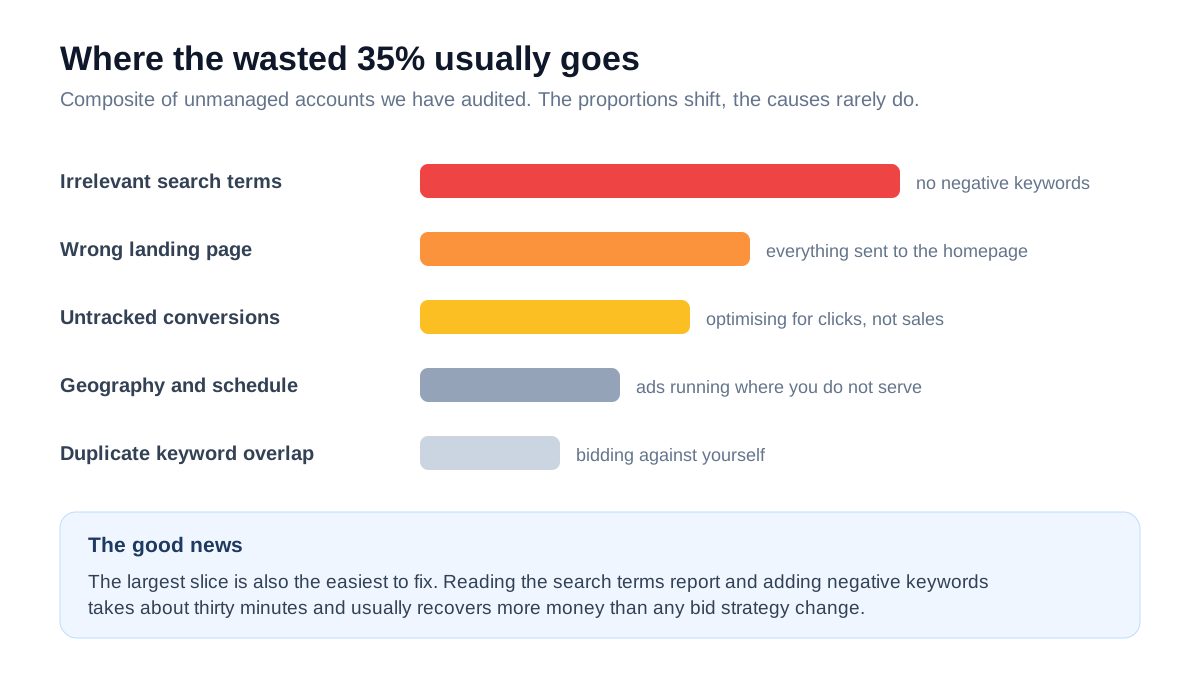
Almost every account we open has money leaking from the same first two rows. Fixing those alone often pays for a year of management.
1. Running without negative keywords
This is the most expensive mistake in Google Ads and the easiest to fix.
Google matches your keywords to searches far more loosely than most people expect. Without negative keywords you end up paying for searches that could never become customers - people looking for free options, DIY instructions, jobs, or an entirely different product that happens to share a word.
A packers and movers client came to us spending Rs 55,000 a month. Their search terms report showed clicks on 'movie packers', 'packing jobs vacancy', 'free packing material' and 'how to pack fragile items yourself'. Roughly Rs 18,000 a month was going to searches from people who were never going to hire anyone.
The fix. Open Search terms in your account, sort by cost, and read the top hundred. Anything irrelevant becomes a negative keyword. Then build a permanent negative list with the obvious ones - free, cheap, jobs, vacancy, salary, DIY, how to, wikipedia, meaning, images - and apply it across campaigns.
Time to fix: about 30 minutes. Do it: weekly for the first two months, then monthly.
2. Using broad match before you are ready
Broad match is not evil, but it is a tool for accounts that already have conversion data and a solid negative list. Used on a new account it behaves like an open tap.
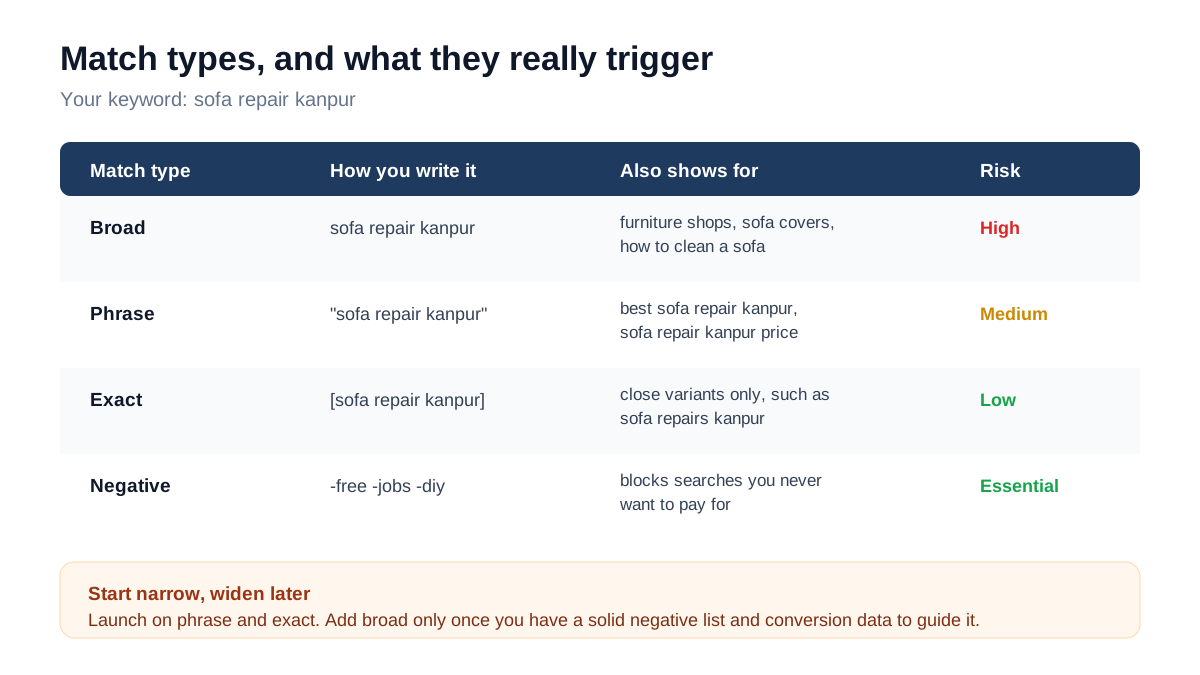
The confusion arises because Google's interface actively encourages broad match, and its recommendations tab will keep suggesting it. Those recommendations are optimised for Google's revenue as much as yours.
The fix. Launch new campaigns on phrase and exact match only. Once you have accumulated a few hundred conversions and a mature negative list, test broad match in a separate campaign with its own budget so you can measure it honestly.
Time to fix: an hour to restructure. Typical effect: immediate drop in irrelevant clicks.
3. Sending every ad to the homepage
If your ad says 'root canal treatment in Kanpur' and the click lands on a general clinic homepage, the visitor has to hunt for what they were promised. Most will not.
This single mismatch is one of the biggest conversion killers we see, and it also raises your costs - Google factors landing page relevance into Quality Score, so a mismatched page means you pay more per click for the privilege of converting less.
The fix. One landing page per service or offer. The page headline should echo the ad, which should echo the search. If you advertise five services, you need five pages - and each one should have its own enquiry form and phone link.
Time to fix: a day or two of page building. Typical effect: we routinely see conversion rate double from this alone. The specifics of what makes those pages convert are in our guide to websites that convert.
4. No conversion tracking, or broken tracking
Roughly a third of the accounts we audit either have no conversion tracking or have it configured wrongly - firing on page load instead of form submission, counting the same lead multiple times, or tracking a thank-you page nobody reaches any more.
Without accurate tracking you are flying blind in a specific and costly way: Google's automated bidding uses conversion data to decide who to show your ads to. Feed it nothing, and it optimises for cheap clicks. Feed it wrong data, and it optimises confidently in the wrong direction.
The fix. Set up conversion actions for form submissions, phone taps and WhatsApp clicks. Test each one by completing the action yourself and confirming it registers. Then check the numbers against your actual enquiries for a fortnight before trusting them.
Time to fix: two to three hours. Priority: do this before anything else on the list, because every other optimisation depends on it.
5. Letting Google optimise for the wrong thing
Related to the point above but distinct. Even with tracking installed, many accounts have the bid strategy set to maximise clicks, which does exactly what it says - buys the largest number of clicks your budget allows, regardless of whether any of them are worth having.
The fix. Once you have around 15-30 conversions a month, switch to a conversion-based strategy - maximise conversions, or target cost per acquisition if you know your number. Below that volume, manual CPC with careful monitoring is usually safer than automation with insufficient data.
One caution: switching bid strategies restarts the learning period. Expect a week or two of unstable performance, and do not switch back in a panic during it.
6. Changing everything in week one
New campaigns need data before they mean anything. Two days of results tells you nothing except that two days have passed.
The pattern we see is a business launching on Monday, seeing four expensive clicks and no enquiries by Wednesday, and rebuilding the whole campaign on Thursday. Each rebuild resets the learning phase, so the account never gets past the most expensive stage of its life.
The fix. Give a new campaign two to four weeks before making structural changes. During that period you should still add negative keywords daily - that is refinement, not restructuring - but leave the bidding, structure and budget alone.
Rule of thumb: you need roughly 30 conversions or 1,000 clicks before performance data is worth acting on.
7. One giant ad group for everything
We frequently open accounts with a single ad group containing forty unrelated keywords and two generic ads. It is the fastest way to build a campaign and the fastest way to make it underperform.
The problem is relevance. If one ad has to serve 'sofa repair', 'chair upholstery' and 'mattress cleaning', it cannot speak directly to any of them. Click-through drops, Quality Score drops, cost per click rises, and the whole account gets more expensive.
The fix. Group tightly - one theme per ad group, ideally three to ten closely related keywords, with two or three ads written specifically for that theme. Small, focused ad groups almost always outperform large mixed ones.
Time to fix: two to three hours of restructuring for a typical small account.
8. Ignoring geography and schedule
Two settings, both defaulted in ways that rarely suit an Indian local business.
Location targeting defaults to including people 'interested in' your area, not just those in it. For a plumber in Kanpur that can mean paying for clicks from other cities entirely. Change the setting to presence only.
Ad schedule runs 24/7 by default. If your phone is answered between 9:30am and 6:30pm and your leads come by phone, you are paying for clicks at 2am that nobody will follow up. Either restrict the schedule or make sure there is a form and an auto-reply covering the gap.
Time to fix: ten minutes. Typical recovery: 5-15% of spend in accounts where this was wrong.
9. Nobody actually answers the leads
The most painful audit finding, because the ads are working and the money is still wasted.
We have reviewed accounts producing 60 or 70 enquiries a month where the business genuinely believed Google Ads did not work for them. The enquiries were arriving in an email inbox that got checked twice a week. By the time anyone called, the customer had already hired somebody else.
The fix. Route enquiries to a phone via WhatsApp or SMS, send an automatic acknowledgement immediately, and give one named person responsibility per shift. We covered the full follow-up sequence in our lead generation guide, and it is worth reading alongside this - the best campaign in the world cannot survive a slow response.
A 30-minute audit you can run yourself
Open your account and work through this in order. Each check takes two to five minutes.
- 1Search terms report, last 30 days, sorted by cost. Any term you would not pay for becomes a negative keyword.
- 2Conversions column. Is it populated? Do the numbers roughly match the enquiries you actually received?
- 3Landing pages. Does each ad point at a page about that exact thing?
- 4Match types. Any broad match keywords in an account without a mature negative list?
- 5Location settings. Presence, or presence-and-interest?
- 6Ad schedule. Running at hours nobody can respond?
- 7Ad group size. More than about ten keywords in one group?
- 8Impression share lost to budget. If it is high, your budget is capping a campaign that could produce more.
- 9Ad strength and count. At least two or three ads per group, each specific to the theme?
- 10Quality Score. Anything at 5 or below is costing you a premium on every click.
Score yourself honestly. Most accounts fail four or five of these, and fixing them typically recovers 20-35% of spend without touching the budget.
A real audit, start to finish
To make the list concrete, here is an account we took over last year - a coaching institute in a tier-two city running admissions campaigns.
What we found. Rs 48,000 a month in spend across two campaigns. One ad group containing 34 keywords covering everything from NEET coaching to computer classes. Everything pointed at the homepage. Conversion tracking existed but fired on page load, so Google believed every single visitor converted. Location targeting was set to presence-and-interest, and the search terms report had never been opened.
The reported numbers looked wonderful. Nearly 3,000 conversions a month at Rs 16 each. The institute knew this was nonsense because admissions had not moved, but nobody could explain the gap.
What we changed, in order. Conversion tracking rebuilt to fire on form submission and phone tap. Search terms report read - about Rs 12,000 a month was going to searches for free study material, job vacancies and courses they did not offer, all of which became negatives. The single ad group was split into six, one per course, each with its own landing page and two ads written for that course. Location narrowed to presence within the districts they actually recruited from. Ad schedule limited to hours the admissions desk was staffed.
Month two, same Rs 48,000 budget. 71 genuine enquiries instead of an imaginary 3,000 conversions. Cost per real enquiry: about Rs 675. Thirty-one of those enquiries were qualified, and nine enrolled.
Nothing clever happened here. No new keywords, no budget increase, no bidding wizardry. The account simply stopped paying for searches that could not become students, and started sending people to a page about the course they had searched for.
The reason this pattern repeats so often is that Google Ads is designed to be easy to start and hard to run well. The defaults favour spend. Left alone, an account does not stay where you set it - it drifts, and the drift is expensive.
Frequently asked questions
How much Google Ads budget is normally wasted?
In unmanaged accounts we typically find 25-45% going to searches, times or places that cannot produce a customer. In a well-maintained account it drops to under 10%, which is the normal cost of testing and cannot be eliminated entirely.
How often should I check the search terms report?
Weekly for the first two months of any new campaign, then monthly once the negative list has matured. It is the highest-value thirty minutes available in the entire platform, and it is the task most commonly skipped.
Should I use Performance Max?
It can work well for e-commerce with a clean product feed and plenty of conversion history. For a new account or a service business with few conversions, it tends to spend broadly with little visibility into where the money went. Build a working search campaign first, then test Performance Max separately if you want to.
Why did my costs jump suddenly?
Usually one of four things: a competitor entered the auction, your Quality Score dropped after a landing page change, a bid strategy switched into a learning period, or broad match was enabled somewhere. Check the auction insights report and your change history - the change history in particular answers this faster than anything else.
Is it worth hiring someone to manage Google Ads?
Below roughly Rs 25,000-30,000 a month in spend, a well-informed owner running a simple campaign can do fine. Past that, the waste from an unmanaged account usually exceeds a management fee, and the gap widens as the account grows more complex.
Can I run Google Ads and SEO at the same time?
Yes, and they help each other. Ads give you keyword conversion data you can use to prioritise SEO, and SEO reduces how much you need to bid on your own brand over time. Most businesses that can afford both run ads for immediate cash flow and SEO to lower the long-term cost per lead - the reasoning is in our SEO playbook.
The bottom line
Google Ads rarely fails because of bad keywords or bad luck. It fails because a few settings are wrong, nobody reads the search terms report, and the leads that do arrive are answered too slowly.
None of the nine fixes above requires a bigger budget. Most of them take under an hour. Together they routinely recover a third of the spend in a neglected account - which is the same as increasing your budget by a third, except it costs nothing and improves every month afterwards.
Start with conversion tracking and negative keywords. Everything else on the list is easier once those two are right.
Want someone to check your account?
We will run the full audit on your Google Ads account and tell you exactly where the money is going - the search terms costing you most, the settings working against you, and what recovering it is worth.
You can see how we structure and price ongoing management on our Google Ads service page, compare complete plans on the packages page, or simply get in touch for an outside opinion first.